NetSuite SuiteCommerce Advanced Custom Product Configurator for Fiber Patch Cables

NetSuite SuiteCommerce Advanced Custom Product Configurator for Fiber Patch Cables

Client Portfolio
Our client, headquartered in Missoula, Montana, is a telecommunications company specializing in innovative fiber-optic solutions. The client is recognized as a leading provider of fiber solutions for commercial, residential, and industrial applications. The company is best known for its proprietary SSF™ (Stronger, Safer, Faster) technology, which simplifies the installation and termination of fiber optics.
They offer a complete ecosystem for fiber optic infrastructure including cabling, connectors and patch cords, hardware, media extension equipment, and complete termination and testing kits designed for field use. The client’s customers often require fiber patch cables tailored to specific environments and lengths, which made efficient and consistent custom configuration a critical part of their digital commerce strategy.
Problem Statement
The client had an internal, excel-based custom patch cable configurator that they shared with their customers. The customers then enter the conditions of the custom patch cables that they require. This is then used by our client’s team to design and generate unique item records for customized cables. While effective behind the scenes, this approach created friction. Customers could not configure their own cables online, and every request had to pass through manual steps, macros, and CSV imports before landing in NetSuite.
As demand for tailored patch cables grew, this model became unsustainable. Sales and operations teams spent valuable time capturing requirements over email, then rekeying data into spreadsheets, and validating each of the configurations. Any miscommunication in this led to rework or delays. Our client wanted to:
· Allow their customers to configure the custom patch cables directly on the SuiteCommerce Advanced storefront, starting from the product detail page.
· Capture all of the critical configuration details, including the connectors on each side, number of connectors, furcation options, cable length, and pull‑eye preferences, in a guided, error‑free flow.
· Automatically translate the customer’s patch cable configuration into a structured CSV file which is suitable for NetSuite item creation, while maintaining internal review and approval before any new item is added to NetSuite.
· Notify the internal stakeholders and customers at key milestones to improve transparency and speed to quote.
In essence, the client was in dire need of a solution that combined customer self‑service, internal control, and tight NetSuite alignment without exposing complex internal rules on the front end.
What We Suggested
We proposed adding an integrated custom patch cable configuration option inside their existing SuiteCommerce Advanced webstore. This will be designed to feel like a natural extension of the Product Detail Page rather than a separate tool. The core elements included:
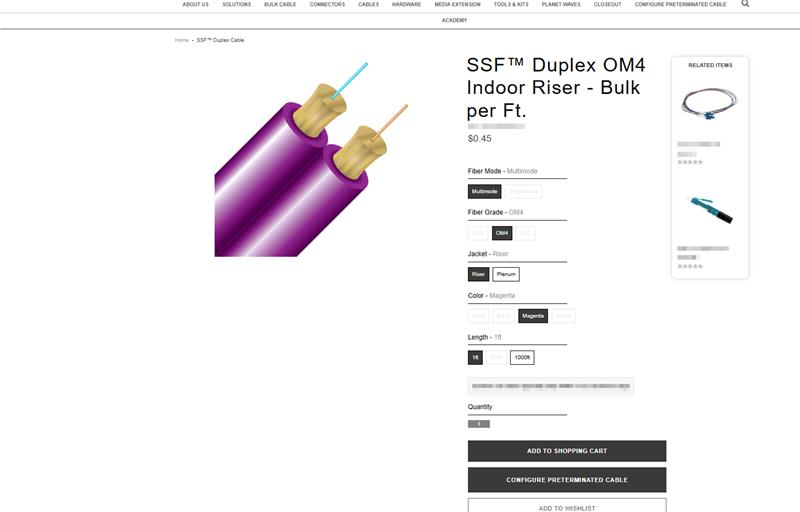
“Configure Custom Cable” trigger on the PDP
· A dedicated button placed next to the “Add to Shopping Cart” option, that is visible only for products flagged as eligible for custom patch cable creation.
· For matrix items, the button adapts to the selected variant, ensuring the configurator is always tied to the correct base cable.
Guided configuration form for both cable ends
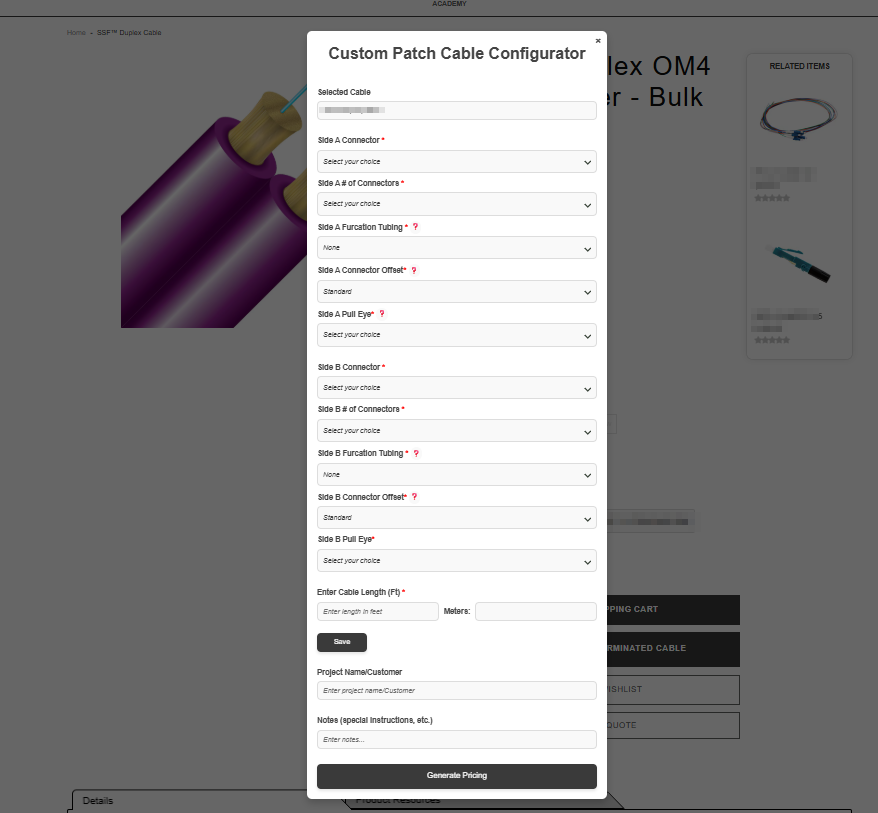
· A dynamic form opens on the PDP when customers click “Configure Custom Cable.”
· Customers select connector style for side A and side B, number of connectors on each side, furcation tubing options, pull-eye type, and cable length.
· The base cable name appears as a non-editable reference, keeping context clear.
· All fields are required, reducing incomplete or ambiguous requests.
Automatic CSV preparation for NetSuite item creation
· Once the customer submits the form using “Generate Patch Cable,” the system processes the inputs and applies the client’s business rules to derive the precise values needed for item creation.
· A structured CSV file is generated and stored in a dedicated folder in the NetSuite file cabinet, with a meaningful filename that includes the new item name, customer reference, and timestamp to avoid duplication.
Internal review and notification workflow
· Sales representatives and designated internal recipients receive an email containing the CSV file and a summary of the configuration details.
· The internal team reviews and validates the request before importing the CSV into NetSuite, ensuring only approved custom items are created.
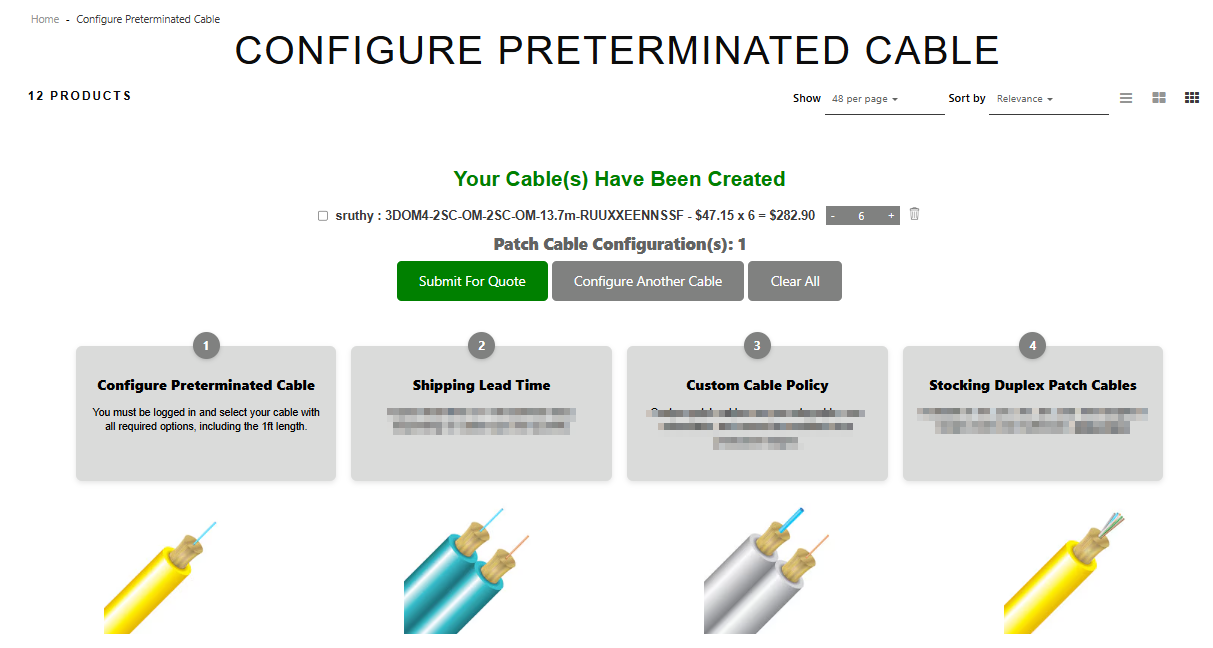
· Customers can view the list of cables they have designed through a dedicated page. Only cables that have not yet been processed will appear here. From this list, the customer can select one or multiple cables to process and convert into products on the website.
· When a customer requests a quote for newly designed cables, an email will be sent to both the customer and stakeholders to notify them that the cable is ready for review. Once verified by stakeholders, the cable can proceed to be converted into an item on NetSuite.
Configurable and controllable through SCA
· Email sender/recipient details and configurator labels are managed through website configuration, giving administrators flexibility without code changes.
· The entire feature is packaged as an extension that can be enabled or disabled through the SCA Extension Manager, keeping rollout and control in the client’s hands.
In short, the solution moved the configurator from a closed spreadsheet to an open, guided, and controlled web experience, keeping the intelligence and approval in-house while giving customers a modern self-service front end.
Major Challenges
· Transforming a macro-heavy Excel workflow into a web experience posed serious challenges. The original configurator depended on complex spreadsheet macros and hidden logic. Translating this into a clean, user-friendly interface without overwhelming customers was a key challenge.
· Our team carefully surfaced only the necessary choices on the PDP while keeping the deeper rules behind the scenes in the CSV generation logic.
· Balancing customer self-service with internal control. The client wanted customers to design cables independently but still needed internal review before creating new items on NetSuite. The solution had to stop short of fully automated item creation. This was resolved by using CSV as the bridge: customers configure, the system prepares the file, and internal teams approve and import.
· Ensuring data consistency and avoiding duplicate items. With multiple users able to submit similar configurations, avoiding duplicate or conflicting item records was critical. The naming pattern, timestamped CSV files, and clear linkage between customer requests and internal review helped keep data clean and traceable.
· Integrating notifications without spamming users. The client wanted better communication, not inbox overload.
· The implementation focused on high‑value triggers, such as configuration submission, item creation, and quote creation, so that, stakeholders receive timely, relevant updates without noise.
Customer Success
Once the Custom Patch Cable Configurator went live, our client’s customers no longer had to describe complex fiber cable requirements over email. They started on the product page, configured exactly what they needed, and knew their request was captured correctly the first time itself.
Internally, sales and operations teams gained a structured, consistent way to receive and process custom requests. CSV files arrived with all required fields populated according to the client’s business rules, making review and NetSuite item creation more efficient and less error‑prone. Quotes for custom cables were issued faster, with fewer clarifications, and customers had clear visibility into the status of their requests. This led our client to gain the customers’ trust and improve business and sales.
Key Achievements
· Seamlessly embedded a custom patch cable configurator into the SuiteCommerce Advanced PDP.
· Empowered the client’s customers to self-configure complex patch cables without sacrificing accuracy.
· Implemented a controlled CSV-based bridge between SCA and NetSuite for new item creation.
· Improved time to quote and reduced manual back‑and‑forth between customers and sales teams. internal stakeholders and customers get notified at key milestones (request submission, item creation, quote creation).
· Delivered an easily configurable extension that can be managed by the client’s administrators.
Way Forward
With the custom patch cable configuration feature in place, our client now has a scalable foundation for digital customization. Future enhancements can include supporting additional cable families, surfacing more contextual guidance in the form (such as recommended options for specific use cases), and extending the workflow to other configurable product lines.
Deeper analytics on configurator usage can help the client understand which combinations are most popular, feed decisions on pre‑built SKUs, and refine pricing strategies. Over time, the same pattern, guided configuration, CSV generation, internal review, can be replicated for other specialized product lines, further strengthening the client’s digital commerce experience.
Are you ready to upgrade your business operations with Oracle NetSuite SuiteCommerce Advanced?
Jobin & Jismi’s SuiteCommerce experts help manufacturers and distributors turn complex, manual configuration processes into guided, web-based experiences that your customers love and your teams can trust. Contact us today to explore how a tailored configurator can streamline your NetSuite and SCA workflows.
FAQ
1. What is a custom patch cable configurator in SuiteCommerce Advanced?
It is a guided tool embedded in the Product Detail Page (PDP) that allows customers to specify connectors, cable length, and other attributes for a custom patch cable. The selections are captured in a structured way and used to create the data needed for a new item in NetSuite.
2. How does this configurator integrate with NetSuite?
Customer inputs are processed into a CSV file following the client’s rules for item setup. This file is stored in NetSuite and sent to internal stakeholders, who review and import it to create the final item record before quoting.
3. Does the configurator create items automatically in NetSuite?
No. The design intentionally keeps an approval step. The system prepares the CSV and notifies the internal team, who validate the configuration and decide whether to import and create a new item.
4. Can the custom patch cable configurator be controlled per product?
Yes. The “Build Custom Cable” button appears only for items flagged as eligible in their item record. This ensures that the configurator is available only where it makes sense.
5. Is the configuration experience mobile-friendly?
The form and PDP integration are designed to be responsive, allowing customers to configure patch cables from desktops, tablets, or mobile devices without losing clarity or control.
6. Can this approach be reused for other configurable products?
Absolutely. The same pattern, that is, guided configuration form, CSV generation, internal review, and NetSuite item creation, can be adapted to other customizable product lines beyond fiber patch cables.
7. How does Jobin & Jismi ensure data accuracy in the CSV files?
Business rules from the original Excel tool are embedded in the application’s logic. Required fields, validation messages, and structured file naming all work together to reduce errors and keep NetSuite item data consistent.
8. What types of businesses benefit most from this solution?
Manufacturers and distributors of configurable products, especially in fiber optics, industrial components, electrical assemblies, and other engineered-to-order items, benefit from bringing internal configurators online in SuiteCommerce Advanced.
Related Case Studies


Automate Financial Workflows with NetSuite-ICICI Bank Integration


Dynamic Graphical Reports for Customer Sales in NetSuite