

Customer Sales Page
Generate Customer Sales Reports directly within NetSuite to gain instant visibility into top customers, total sales, order value, discounts, and lifetime value. Apply date range and ranking filters, review performance in an interactive table, and export results to CSV for quick analysis and confident decision‑making.
- SKU :PDNSCSP01
- Last Update :April 2026
- Support for :NetSuite
- Implementation time :3 Business Days
Customer Sales Page
Customer Sales Report by Performance Metrics
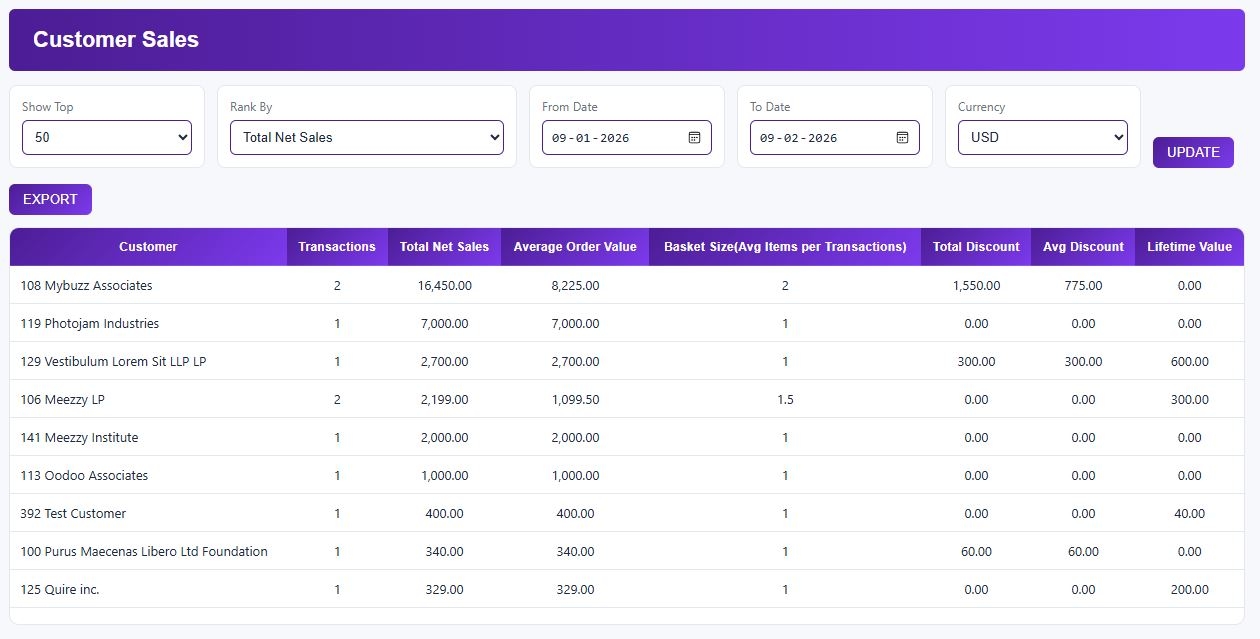
Generate Customer Sales Reports directly in NetSuite with flexible date range and ranking options. View consolidated metrics such as total transactions, net sales, average order value, discounts, basket size, and customer lifetime value in a single dashboard.
Analyze customer performance using an interactive table and export results as CSV for fast reporting and accurate business insights.
Customer Sales Reporting in NetSuite
Get a consolidated view of customer sales performance using key metrics such as total transactions, net sales, average order value, basket size, discounts, and lifetime value. This unified dashboard helps quickly identify high‑value and top‑performing customers.
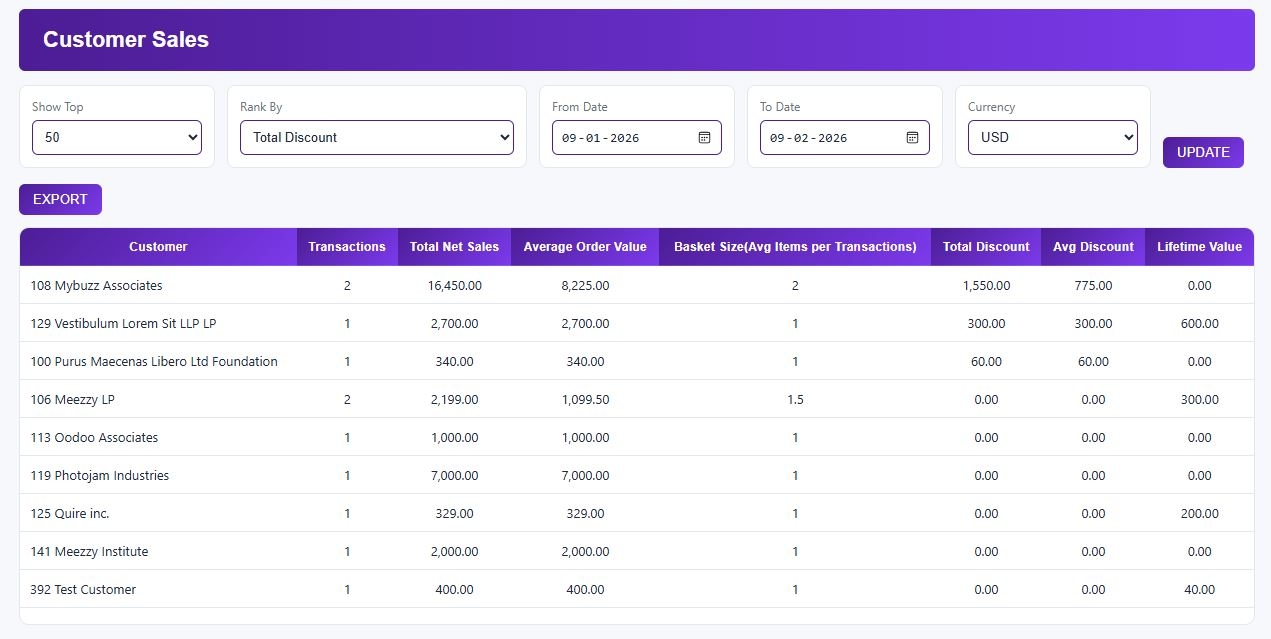
Rank customers by transactions, net sales, discounts, or lifetime value and focus on the top 50, 100, 250, or 500 customers. Apply date range filters to ensure insights reflect the exact sales period you want to analyze.
Track customer purchasing behavior by reviewing total discounts, average discounts per order, and overall order trends. These insights help businesses understand pricing effectiveness and customer buying patterns.
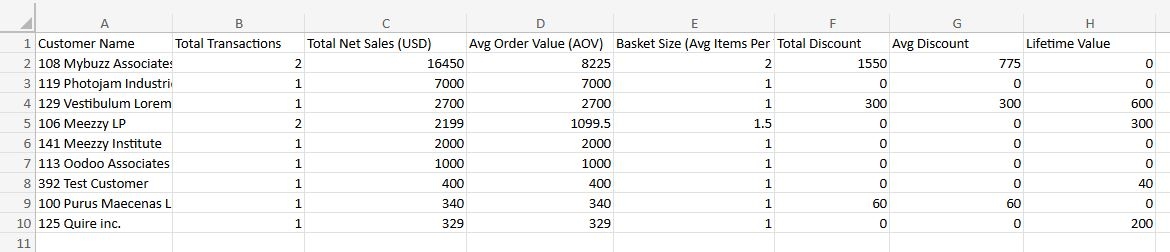
Export filtered customer sales data into CSV format for further analysis or sharing with stakeholders. This allows teams to work with clean, ready‑to‑use data outside NetSuite without manual effort.
Requirements and Considerations
- Reports are generated only for completed sales transactions available in NetSuite and linked to valid customer records within the selected date range.
- Customer ranking and KPI calculations are based on the selected filters, ranking metric, and available transaction data for the chosen period.
- CSV export is enabled only when valid customer sales results are returned based on the applied date range, ranking, and filter criteria.
Improved Customer Sales Visibility and Insights
- View customer sales metrics, order trends, discounts, and lifetime value in a single report.
- Eliminate manual data collection and speed up analysis with consolidated insights.
- Identify top‑performing customers using metrics such as total transactions, net sales, and average order value.
- Focus business efforts on building and maintaining high‑value customer relationships.
- Provides reliable, filter‑based insights for pricing, promotions, and customer engagement strategies.
- Enables teams to make informed decisions quickly and confidently.
- Export customer sales data to CSV with applied filters for quick sharing and deeper analysis.
- Enable seamless collaboration across teams by providing accessible, filter‑ready data.
Frequently Asked Questions
The Customer Sales Report updates when you click the UPDATE button, pulling the latest available transaction data from NetSuite based on the selected filters. Data is not refreshed automatically.
The report includes Sales Orders only, excluding pending, approved, cancelled, or closed transactions, as well as shipping, tax, and COGS lines. Results are limited to transactions within the selected date range.
Yes, customers can be ranked by Total Transactions, Net Sales, Total Discount, or Lifetime Value, with additional filters for date range and Top‑N selection (Top 50, 100, 250, or 500 customers).
Yes, the report can be exported to CSV format once valid customer sales results are returned based on the applied filters and ranking criteria.
Yes, the report supports a maximum 12‑month date range to ensure accurate results and optimal performance.