

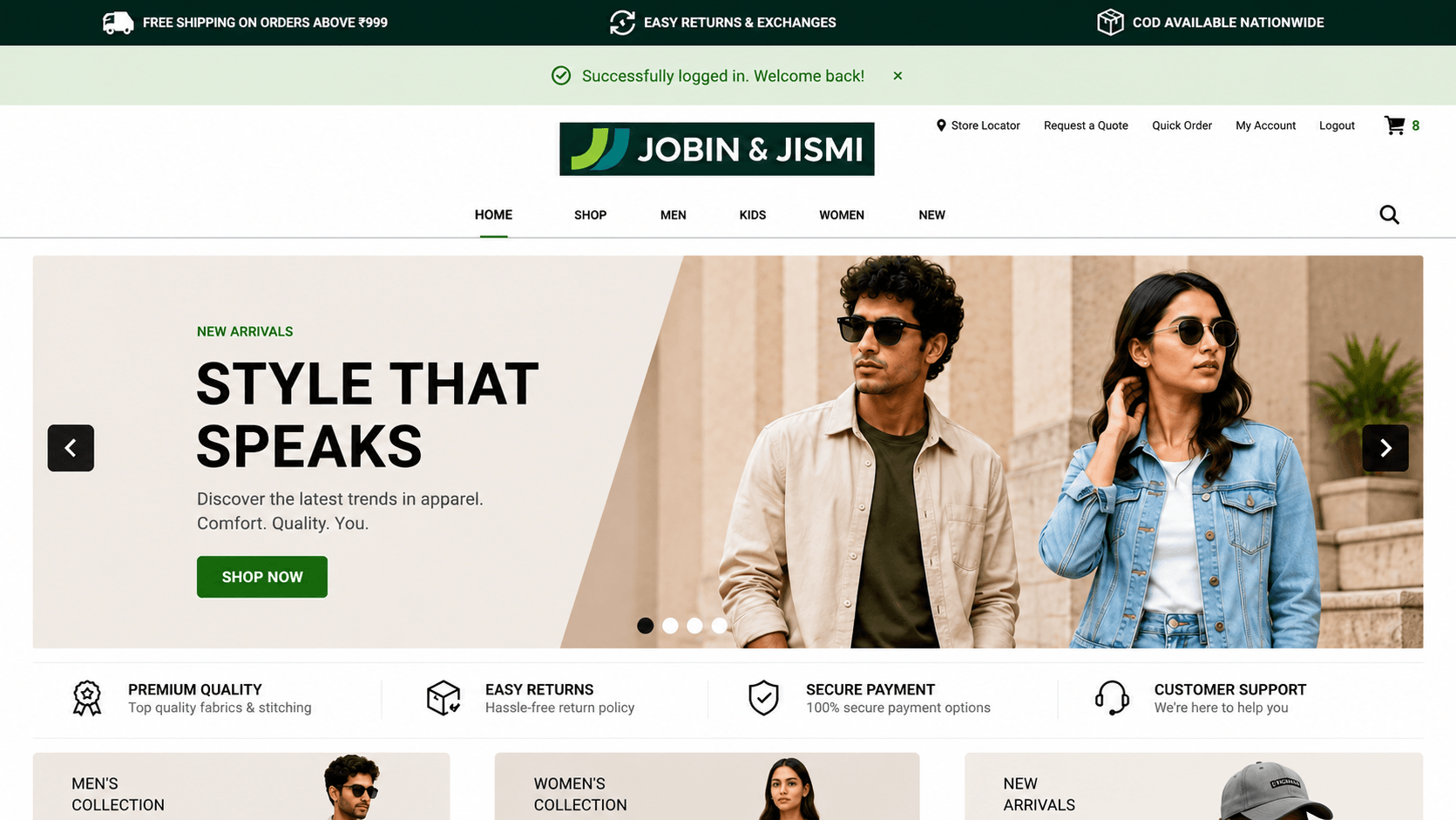
Instant Login Gateway
Instant Login Gateway is a SuiteCommerce and SuiteCommerce Advanced (SCA) extension that gives customers one seamless login across your connected platforms. Customers who arrive from a connected external system are recognised and signed in automatically, with no manual login, on the Shopping, My Account, and Checkout pages. Their credentials are checked securely in the background, and the login details are removed from the URL as soon as they're signed in.
- Last Update :October 2026
- Published :02 Oct 2026
- Support for :SuiteCommerce, SuiteCommerce Advanced (SCA)
- Implementation time :4 to 5 Days
Instant Login Gateway
One seamless login across all your connected platforms
SSO Login removes the friction of manual sign-in for customers who arrive at your SuiteCommerce store from an external platform, portal, or partner site. The moment a customer lands on your store, they are automatically recognised and logged in, without ever seeing a login form. The experience works consistently across your Shopping, My Account, and Checkout pages, so customers can browse, manage their account, or complete a purchase without any interruption. Failed or unavailable login attempts are handled gracefully with clear, friendly on-screen messages, so customers always know what is happening.
Automatic, Effortless Login for Customers from Connected Platforms
Customers are logged into the store automatically the moment they arrive from a connected platform, no login form, no password entry, no extra clicks required.
SSO login is active across the Shopping, My Account, and Checkout areas of your store, so customers land directly in a fully authenticated session no matter which page they are directed to.
Login credentials are validated securely behind the scenes and the URL is cleaned up immediately after sign-in, so customers never see technical tokens or parameters in their browser address bar.
Customers see a clear, dismissible banner letting them know they are being logged in. If a login cannot be completed, a helpful message is shown so they are never left confused or stuck.
Integration Scope & Requirements
- The extension must be activated across the Shopping, My Account, and Checkout touchpoints via the SuiteCommerce Extension Manager.
- Applicable only for SuiteCommerce and SuiteCommerce Advanced (SCA) websites.
- Requires a backend validation service to be configured and deployed in your NetSuite account before the extension is live.
- The external platform or portal must be set up to pass the required login parameters in the URL when redirecting customers to your store.
- Administrative access to your NetSuite account is required for initial setup and deployment.
A Smoother, Faster Experience for Every Connected Customer
- Customers arrive already logged in, so they can browse, add to cart, and check out without any interruption.
- No password prompts or login forms means fewer drop-offs at the start of the customer journey.
- Ideal for B2B buyers, loyalty members, and customers using connected portals or partner platforms.
- SSO login works across every area of the store- Shopping, My Account, and Checkout- so there are no gaps in the authenticated experience.
- Customers can land on any page from an external link and still be recognised and logged in immediately.
- Seamless session handling means customers can continue right where they left off on the connected platform.
- Login happens automatically and securely in the background, with no visible technical steps for the customer.
- The browser address bar is always clean and professional, with no tokens or technical parameters visible to the customer.
- Clear, friendly status messages reassure customers throughout the login process.
- Eliminating the manual login step reduces drop-off and gets customers into the shopping experience faster.
- Automated sign-in is especially valuable for repeat B2B buyers who place orders regularly from connected systems.
- A smoother login experience builds customer confidence and encourages return visits.
Frequently Asked Questions
It automatically logs customers into your SuiteCommerce store the moment they arrive from a connected platform or portal, no login form, no password entry needed. They land directly in an authenticated session and can start shopping, managing their account, or checking out straight away.
SSO Login is active across all three main areas of the store - Shopping, My Account, and Checkout - so customers are automatically signed in no matter which page they are directed to from the external platform.
If the login process cannot be completed for any reason, such as an expired or invalid token or a temporary service issue, the customer sees a clear, friendly message on screen explaining the situation. They are never left on a blank page or shown a confusing error.
Yes. SSO Login supports both SuiteCommerce and SuiteCommerce Advanced (SCA) and is activated through the standard SuiteCommerce Extension Manager.
The full setup typically takes 3 to 5 business days, including configuration of the backend validation service and activation of the extension across all required touchpoints.