

Item Sales Sheet
Instantly generate product reports directly in NetSuite with complete item details, current pricing, and inventory information. Search by product name or number, filter by customer, and export excel files for quotes, catalogs, and analysis.
- SKU :PDNSISS01
- Last Update :April 2026
- Support for :NetSuite
- Implementation time :3 Business Days
Item Sales Sheet
Generate Item Sales Sheets
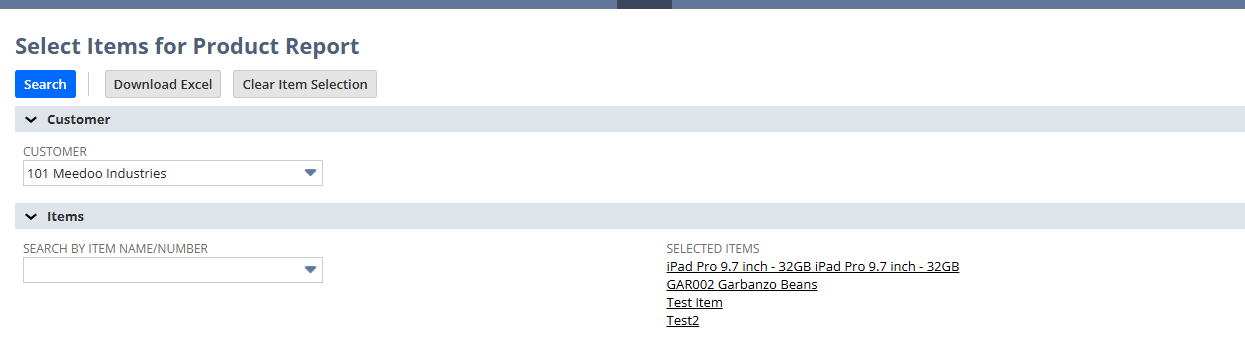
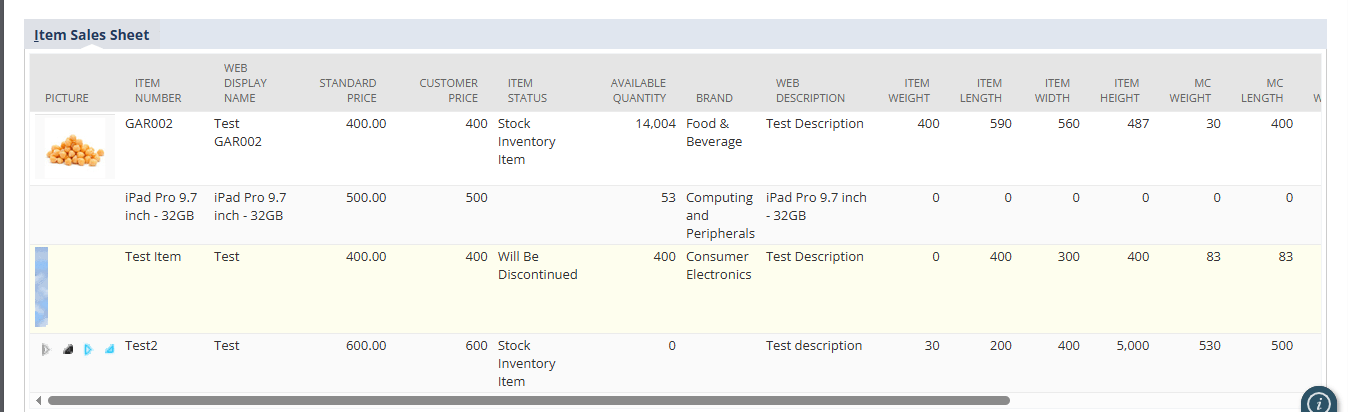
Generate professional Item Sales Sheets directly inside NetSuite which quickly select products, optionally filter by customer, and export selected items as polished excel files containing item details, pricing, inventory, dimensions, case quantities, and barcodes.
Item Sales Sheet in NetSuite
Consolidate data from item records, inventory levels, and case quantities into a single view, providing a complete picture of product availability and inventory status.
Handle large datasets with automatic pagination, allowing users to navigate thousands of items without performance issues.
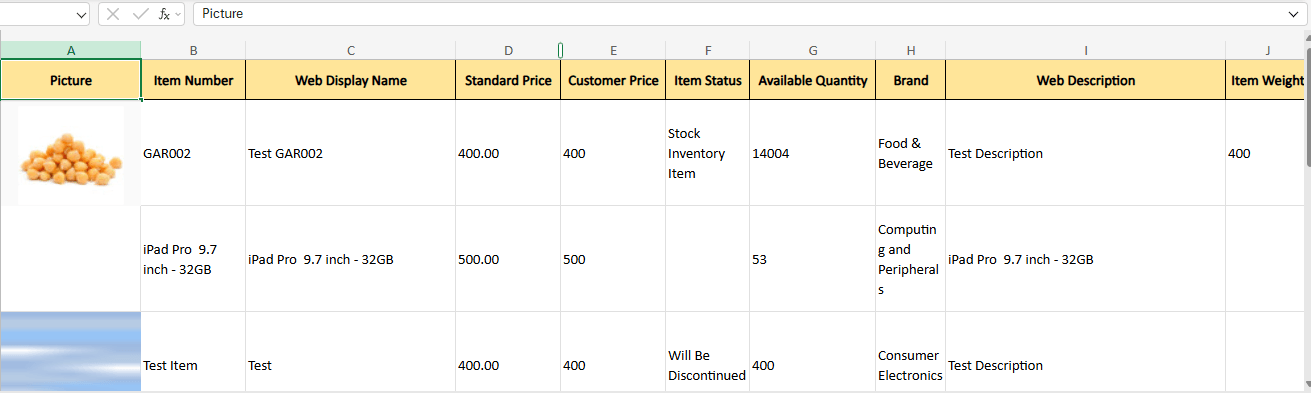
Export detailed item sales sheets in excel format with embedded product images and structured columns for product details, dimensions, and barcodes, enabling easy analysis and sharing.
Select a customer from the dropdown to filter results; pricing shown is the item’s standard price.
Requirements and Considerations
- Reports can be generated once items are selected, and only active items appear in search results while inactive items are excluded.
- Customer selection is optional during search, allowing users to view item details with standard pricing by default, and when a customer is selected their negotiated pricing automatically applies for accurate reporting.
- Excel (.xlsx) export is available only when items are selected; the client validates the selection and prevents empty exports.
Key Benefits of Item Sales Sheet in NetSuite
- Combines product information into a single report.
- Provides availability and case quantities in one place.
- Reduces manual work and removes the need for separate spreadsheets.
- Provides accurate item details aligned with NetSuite records
- Includes customer‑specific negotiated pricing
- Uses real‑time lookups to keep pricing and quotes up to date
- Gain clear visibility into product inventory levels
- View item availability for selected customers using structured reporting
- Use flexible filters to provide instant access to accurate pro
- Handle large datasets using pagination
- Support Excel (.xlsx) export for growing customers and product lines
- Process thousands of items efficiently without performance issues
Frequently Asked Questions
Search for items using the item name or number field and click "Search." Optionally select a customer to apply customer‑specific pricing. The report automatically loads all related product details and inventory information.
Yes. You can combine the customer selection with item name or number search to narrow down the report to specific items and customers, allowing precise filtering of product data.
Yes. When valid item results are returned, you can export the report as an excel (.xlsx) file with embedded images and all product details for further analysis or customer sharing.
If the search returns no matching items, the report will display an empty sublist, and the export option will not appear until valid results are returned.
Yes, it handles large catalogs efficiently, letting you browse and export thousands of items without slowing down.