

Most Returned Products Report
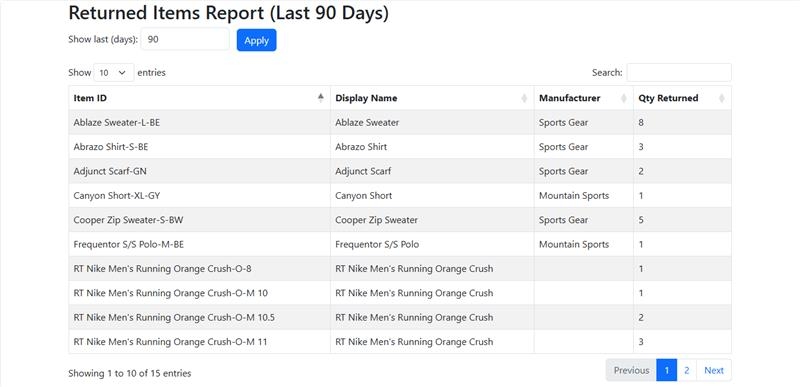
Gain instant visibility into returned items directly inside NetSuite, with clear insights into volumes, product trends, and supplier performance. The solution turns complex return data into actionable intelligence that helps reduce costs, improve quality, and strengthen customer satisfaction.
- SKU :PDNSMRP01
- Last Update :September 2025
- Support for :NetSuite
- Implementation time :2 Business Days
Most Returned Products Report
Returned Items Analysis & Product Performance Dashboard for NetSuite
The report provides a complete view of return activity, from product trends to supplier impact, all in one place. It transforms scattered return data into clear insights that reveal hidden costs, recurring issues, and opportunities for improvement. By delivering always‑current dashboards directly inside NetSuite, it streamlines reporting, strengthens decision‑making, and helps protect both profitability and customer trust.
Highlight Product Return Trends with Real‑Time NetSuite Insights
Return activity is captured in real time, so you always know which products and vendors are driving the highest volumes. This ensures issues are spotted quickly and addressed without delay.
Key factors behind returns are surfaced immediately, making it easy to detect patterns and take corrective action. Teams can respond faster to recurring issues and prevent unnecessary costs.
All customer return data is brought together in one place, making it simple to compare patterns and spot unusual activity. This unified view helps teams strengthen service quality and build stronger customer relationships.
Dashboards can be tailored to highlight the metrics that matter most, helping teams focus on cost reduction, quality improvement, and customer satisfaction.
Displays sold and returned quantities together for each product. Provides a clear view of return impact relative to sales volume.
Provides drill-down to underlying transactions for each return entry. Enables detailed investigation of return patterns and exceptions.
Displays return data across selected time periods. Supports comparison of return trends over time.
Groups returned products by category or product type. Enables analysis of return concentration across segments.
Data Requirements & Setup Parameters
- Return data must be properly recorded in NetSuite to ensure accurate tracking and reporting.
- Only returns processed and approved within NetSuite are included; external or offline records are excluded.
- Return reasons and categories should be standardized in the system for consistent analysis.
- Access permissions should be managed so only authorized users can view or adjust return information.
Turn Return Data into Smarter Decisions
- Centralized return data eliminates manual tracking and fragmented records.
- Faster identification of recurring issues reduces wasted time and costs.
- Transparent handling of returns builds confidence and loyalty.
- Quick resolution of issues enhances overall customer experience.
- Trend analysis highlights recurring product or supplier issues before they escalate.
- Clear insights guide smarter inventory, sourcing, and quality decisions.
- Standardized processes ensure every return is tracked and reported consistently.
- Controlled access safeguards sensitive data and maintains accountability.
- Track return impact on revenue
- Identify high-loss products
- Improve margin visibility
- Detect problem products early
- Highlight return spikes
- Support quick action
- Identify underperforming products
- Support product improvements
- Refine product strategy
- Identify root causes
- Address recurring issues
- Improve product quality
- Monitor return trends
- Compare across segments
- Track over time
- Shared visibility across teams
- Align finance and operations
- Support coordinated actions
- Identify unusual return patterns
- Highlight sudden spikes
- Enable proactive response
- Adjust stocking decisions
- Avoid high-return products
- Improve inventory mix
Frequently Asked Questions
Access is controlled through NetSuite’s role‑based permissions. Only authorized users can view or manage return information.
Yes, it categorizes returns by reason codes, making it easy to spot recurring product, supplier, or process issues.
Insights update in real time, so managers can act immediately on emerging patterns instead of waiting for static reports.
Yes, return categories, dashboards, and KPIs can be tailored to align with specific workflows. This flexibility ensures the tracker fits seamlessly into existing operations.
By identifying recurring issues and root causes, it enables proactive fixes that lower return volumes and improve profitability.
Yes. The report calculates return rates based on return quantity against sold quantity, enabling performance comparison across products.
Yes. The report includes period comparison views to analyze return trends across selected time ranges.
Yes. Trend analysis highlights sudden increases in return volume or rate, helping identify potential issues early.
Yes, with configuration. Returns can be segmented by sales channel (e.g., via item fulfillment or sales order fields), enabling channel-level analysis and performance tracking in custom reports.