

NetSuite GL Segment Enforcement
Ensure accurate financial reporting in NetSuite by enforcing segment tagging rules per GL account and subsidiary. This will block transactions missing required Department, Location, or Class values, with configurable rules and user-friendly error handling.
- SKU :PDNSGLS01
- Last Update :September 2025
- Support for :NetSuite
- Implementation time :2 Business Days
NetSuite GL Segment Enforcement
Segment Validation & Enforcement Tool for NetSuite Transactions
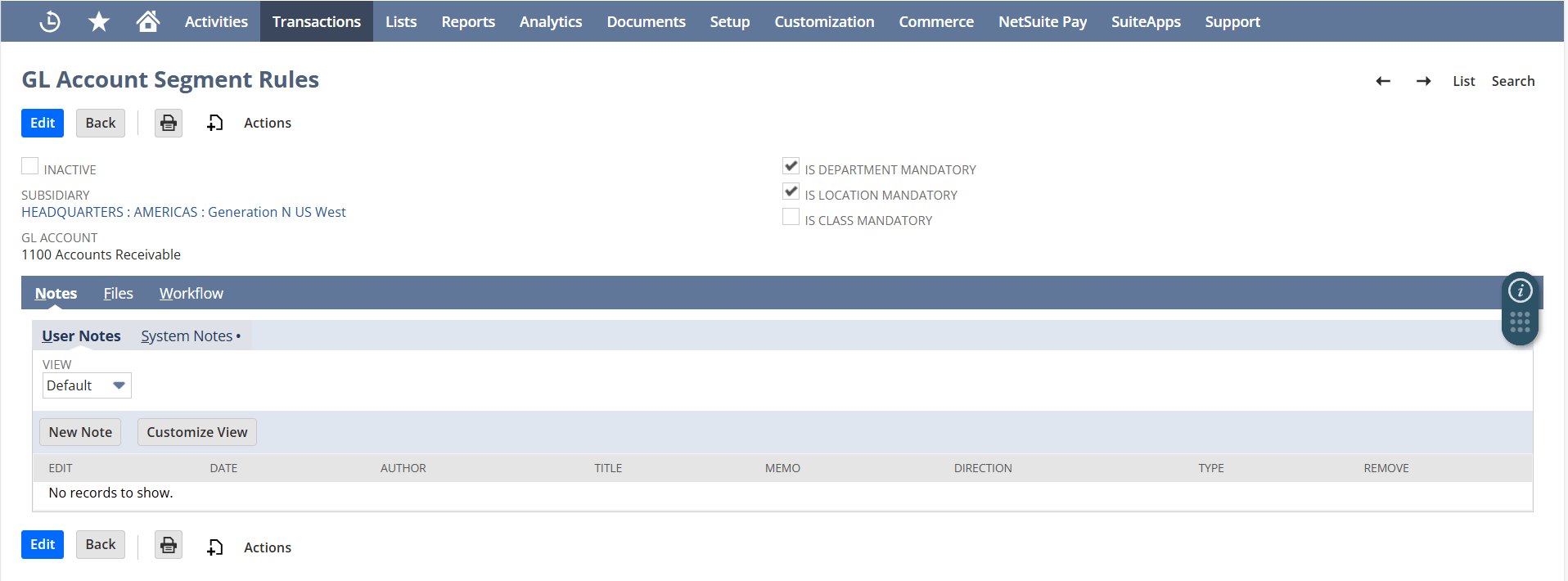
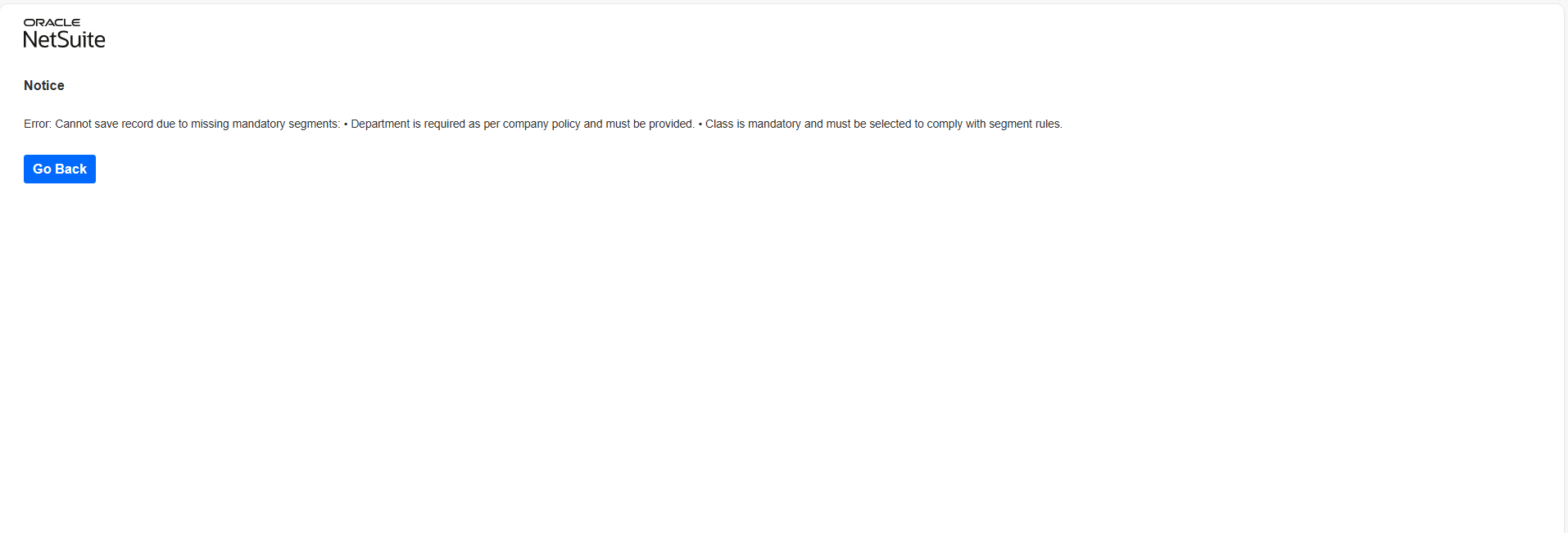
Enforces segment tagging compliance across NetSuite transactions by validating Department, Location, and Class fields based on GL account and subsidiary-specific rules. Admins can configure rules via a custom interface, ensuring flexibility across subsidiaries and account types. The system automatically blocks transactions missing required segments, providing clear error messages to guide users. It supports a wide range of transaction types and integrates seamlessly with NetSuite workflows, including CSV imports and WMS processes.
Segment Enforcement Features for NetSuite Transactions
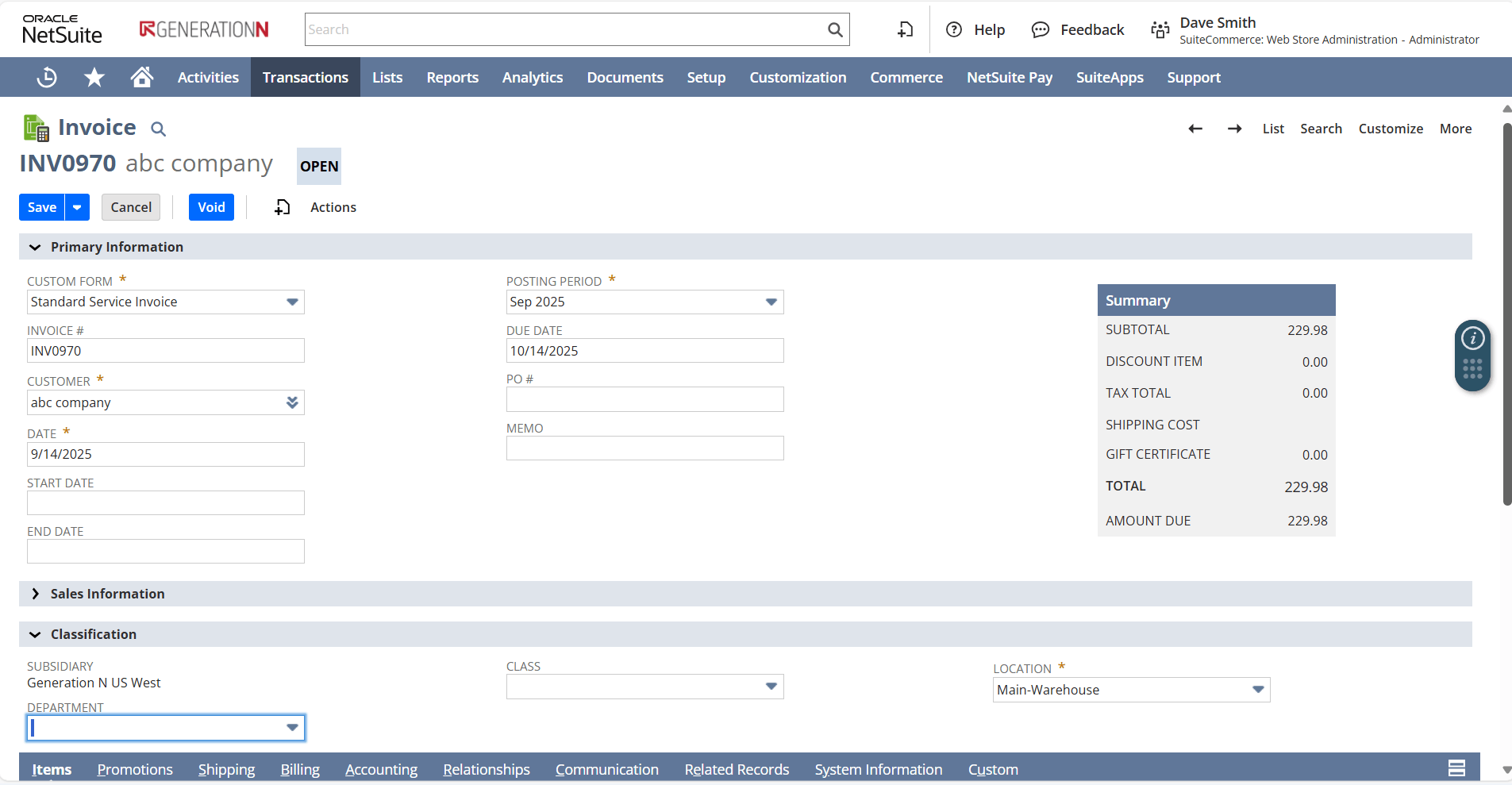
Automatically validates segment tagging on NetSuite transactions using GL account and subsidiary-specific rules. Users are alerted with clear error messages when required fields like Department, Location, or Class are missing ensuring compliance without manual checks.
Provides real-time validation during transaction entry, alerting users instantly when required segments are missing. This proactive feedback helps users correct data before submission, reducing rework and improving data accuracy across finance operations.
Let users quickly view segment enforcement status across multiple transaction types without navigating through individual records. This centralized approach simplifies compliance checks and speeds up review processes for finance and operations teams.
Applies segment validation logic across multiple NetSuite modules including finance, procurement, and inventory—ensuring consistent enforcement regardless of transaction type. This unified approach gives users a clear view of compliance across departments without navigating separate workflows.
Define validation rules for required and optional segments based on your business logic. Ensure all transactions meet predefined segment requirements before posting.
Automatically populate segment values using predefined rules and mappings. This reduces manual input and improves consistency across transactions.
Enforce logical relationships between segments to ensure only valid combinations are used. Prevent incorrect mappings across departments, locations, or business units.
Allow authorized users to override validation rules when required. Maintain control while enabling flexibility for exceptional cases.
Validate transactions at the system level, including UI entries, CSV imports, and third-party integrations. Ensure consistent enforcement across all data entry points.
Manage and update all validation rules from a single interface. Simplify administration and maintain consistency across the system.
Apply validation checks during large data imports to prevent incorrect entries from being uploaded. Reduce downstream data correction efforts.
Route validation exceptions through an approval workflow before processing. Ensure proper review and control over deviations.
Validation Scope, Usage Guidelines & Configuration Notes
- Segment validation applies only to standard NetSuite fields (Department, Location, Class); custom or renamed fields must be properly mapped to avoid validation failures.
- To ensure the system works correctly, the combinations of account types and business units need to be accurately set up in the custom settings.
- Transactions processed via CSV imports or warehouse systems might skip UI-based validation; backend validation should be implemented in future phases.
- The solution does not automatically support custom transaction types unless extended via customization.
- Role-based access may restrict visibility or editing of configuration records; ensure proper permissions are granted to rule administrators.
Streamlined Compliance & Transaction Accuracy
- Users receive immediate feedback when required segments are missing, reducing time spent on error correction.
- Automated validation eliminates the need for manual checks, streamlining transaction processing.
- Centralized rule management simplifies configuration and ensures consistent enforcement across subsidiaries.
- Operates entirely within NetSuite’s native transaction flow—no external tools or exports required.
- Validation logic runs automatically during transaction entry, keeping data consistent and compliant in real time.
- Seamlessly supports standard NetSuite records, ensuring smooth integration without disrupting existing processes.
- Tailored enforcement logic per subsidiary and GL account, ensuring compliance with localized business policies and operational structures.
- Dynamic configuration via custom records, allowing admins to easily define mandatory segments (Department, Location, Class) without code changes.
- Supports diverse transaction types, enabling consistent enforcement across journal entries, purchase orders, invoices, and more.
- The system automatically checks that important business details are included when entering financial transactions, helping reduce mistakes and keep your data reliable.
- If something is missing, users get clear and instant feedback so they can fix it before moving forward.
- This also saves time by removing the need to go back and correct entries later, making processes smoother across teams.
Track return impact and identify products affecting margins.
Identify problem products and unusual return spikes early.
Refine product strategy based on return performance.
Address root causes behind recurring return issues.
Monitor trends and compare performance across segments.
Enable shared visibility for coordinated decision-making.
Adjust stock based on return behavior and product performance.
Frequently Asked Questions
Yes, transactions are blocked during CSV imports and WMS processes if required segments are missing.
Yes, rules can be customized for each GL account and subsidiary using a dedicated configuration form. This gives admins full control over which segments are mandatory for specific transaction scenarios.
No, it is optimized to run efficiently during transaction processing. It uses lightweight lookups and validations, so it won’t noticeably affect NetSuite performance.
Yes, the solution is designed to work safely across multiple subsidiaries and transaction types without hardcoded values. It uses dynamic lookups and configuration records, making it scalable and secure for complex NetSuite environments.
Yes, different teams can define and manage their own segment tagging rules using the custom form. This flexibility ensures that each department’s compliance needs are met without interfering with others.
Transactions with missing required segments are flagged or blocked based on configured rules, ensuring incomplete data is not processed.
It enforces validation rules on GL segments across transactions, ensuring required fields are completed and segment combinations are accurate.
Yes, validation is applied at the backend level for imports and integrations, preventing invalid data from entering the system.