

PO Worksheet Details
PO Worksheet details interface provides a centralized, filterable, and exportable dashboard inside NetSuite that consolidates Purchase Order line-level data into one structured worksheet. It enables planners, buyers, and inbound warehouse teams to quickly analyze in-transit stock, case quantities, available inventory, and backorders with real-time visibility and one-click Excel export for reporting and decision-making.
- SKU :PDNSPOW01
- Last Update :February 2026
- Support for :NetSuite
- Implementation time :3 Business Days
PO Worksheet Details
NetSuite Automated PO Worksheet & Inbound Planning Dashboard
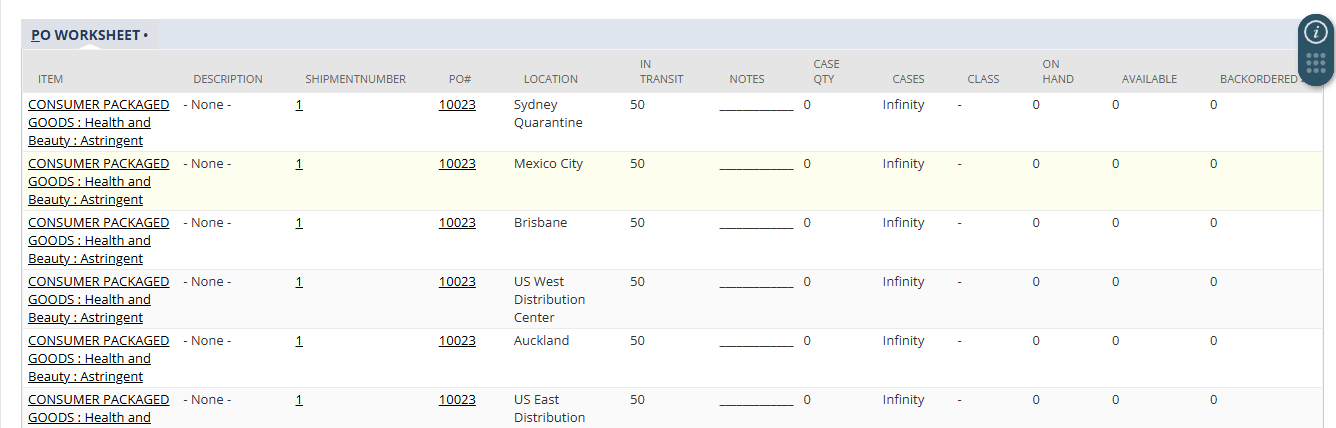
The PO Worksheet custom interface aggregates Purchase Order line data linked to selected Inbound Shipments and presents it in a structured grid view.
Instead of checking the PO record, Item record, Inventory balance, Backorders and Manual spreadsheets; Users gets everything in one screen.
Purchase Order Worksheet Interface
Displays every Purchase Order line along with key operational details - item information, quantities, availability, case calculations, and backorders, all in one structured worksheet. This eliminates the need to navigate multiple NetSuite records. Users gain complete clarity for planning and review.
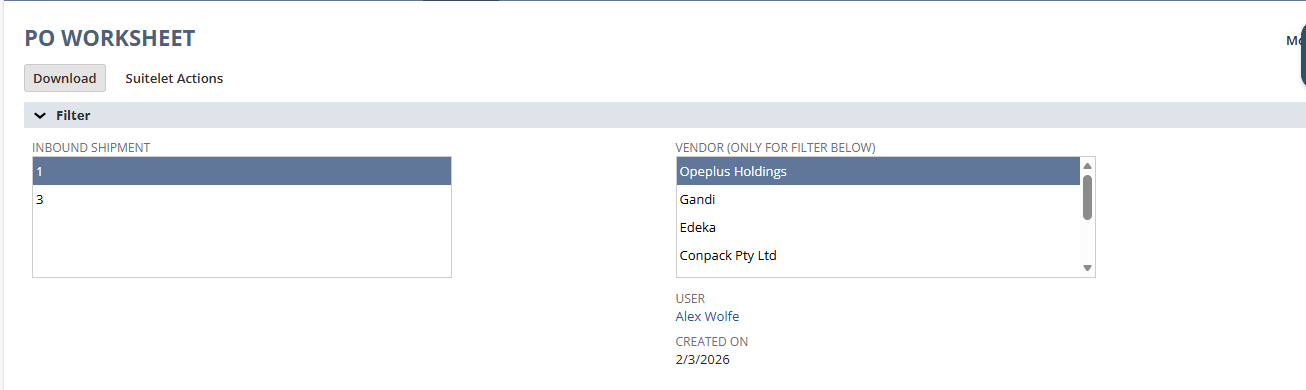
Allows users to filter PO data based on one or multiple inbound shipments. This ensures only relevant lines are shown, keeping the worksheet focused and accurate. It enhances planning by removing noise and presenting only actionable data.
Provides instant search across item numbers, display names, and PO numbers. Users can rapidly locate specific records even within large datasets. This speeds up daily planning and minimizes time spent scrolling.
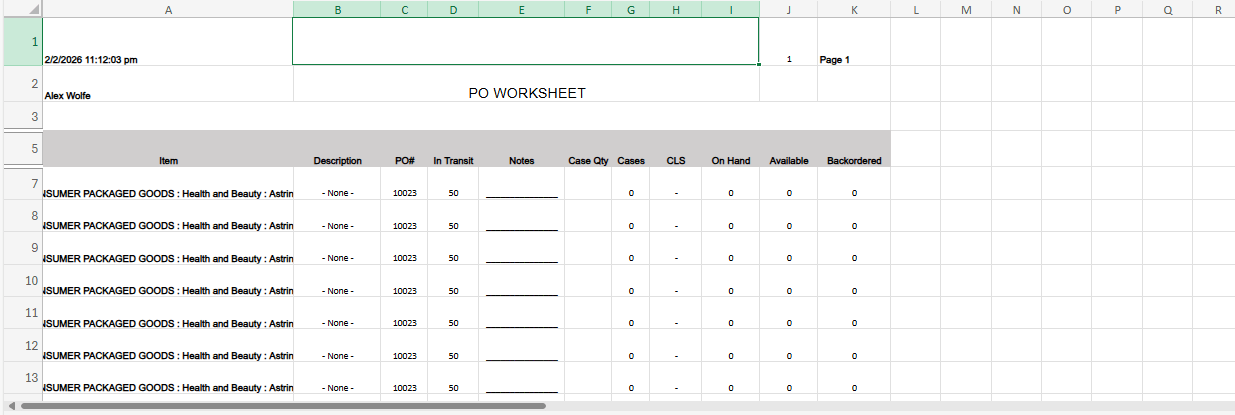
Enables exporting the entire filtered worksheet—including all pages and case calculations—into a clean, structured Excel file. The export maintains formatting and includes a blank Notes column for planner comments. This makes sharing and reporting effortless.
Setup & Configuration Requirements
- Required NetSuite features and Inbound Shipments, Purchase Orders, and Item Records, must be enabled and properly configured.
- Users must have the necessary NetSuite role permissions to view PO, Item, and Inventory data; restricted roles may see limited results.
- Data accuracy depends on up‑to‑date information in Purchase Orders, Item Master, and custom fields like Case Quantity.
- Excel export performance may vary based on data volume and browser limitations.
- Any customizations or additional filters beyond the default feature set require enhancement effort.
- The worksheet displays data only from active or valid inbound shipments and may exclude closed or invalid records.
Key Benefits of PO Worksheet Details
- Consolidates all inbound PO data into one screen, removing the need to open multiple NetSuite records.
- Speeds up daily review and reduces overall operational effort.
- Eliminates manual Excel preparation and case‑math calculations.
- Minimizes page‑switching between PO, Item, and Inventory records, saving significant time.
- Provides instant visibility into incoming quantities, available stock, and backorders.
- Helps teams make more accurate allocation and prioritization decisions.
- Answers critical questions - stock sufficiency, incoming quantities, urgent items - within the same interface.
- Allows planners to act quickly without navigating multiple NetSuite pages.
Frequently Asked Questions
Yes. The report supports pagination and supports large volumes.
Cases displays null in the column and export remains blank to avoid calculation errors.
Yes. Entire filtered dataset is exported, not just visible rows.
Yes. Data visibility strictly follows NetSuite role permissions.
Yes. Date, vendor, or location filters can be added as enhancement.