

Smart Catalog Export
The CSV Export extension adds a one-click download button to any Product Listing Page, letting authorized shoppers export complete, paginated product catalogues as structured CSV files. Each export captures IDs, SKUs, pricing, stock status, and image URLs, with price-visibility controls ensuring sensitive data stays protected across SuiteCommerce and SCA storefronts.
- Last Update :September 2026
- Published :02 Sep 2026
- Support for :SuiteCommerce, SuiteCommerce Advanced (SCA)
- Implementation time :4 to 5 Days
Smart Catalog Export
Instant Product Data Downloads Straight From Your Product Listing Page
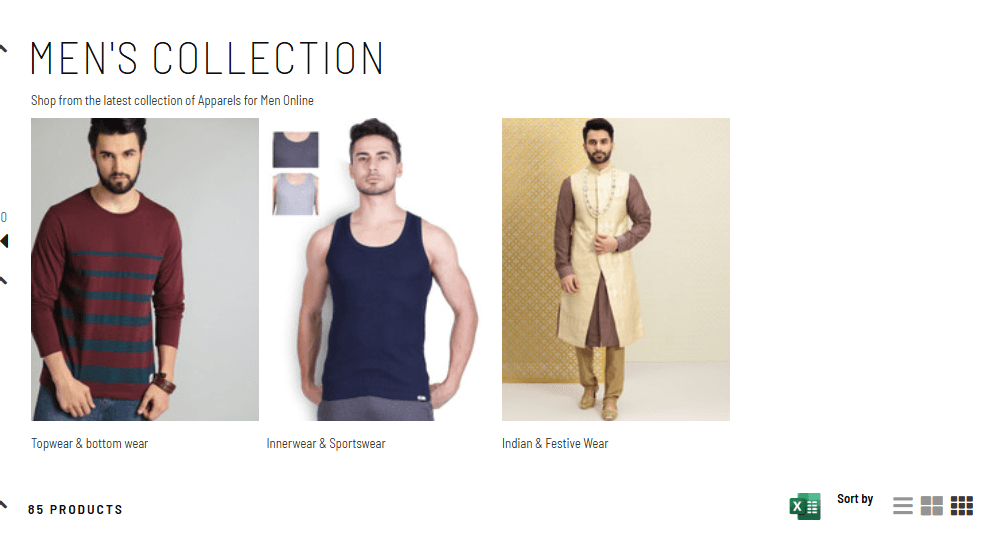
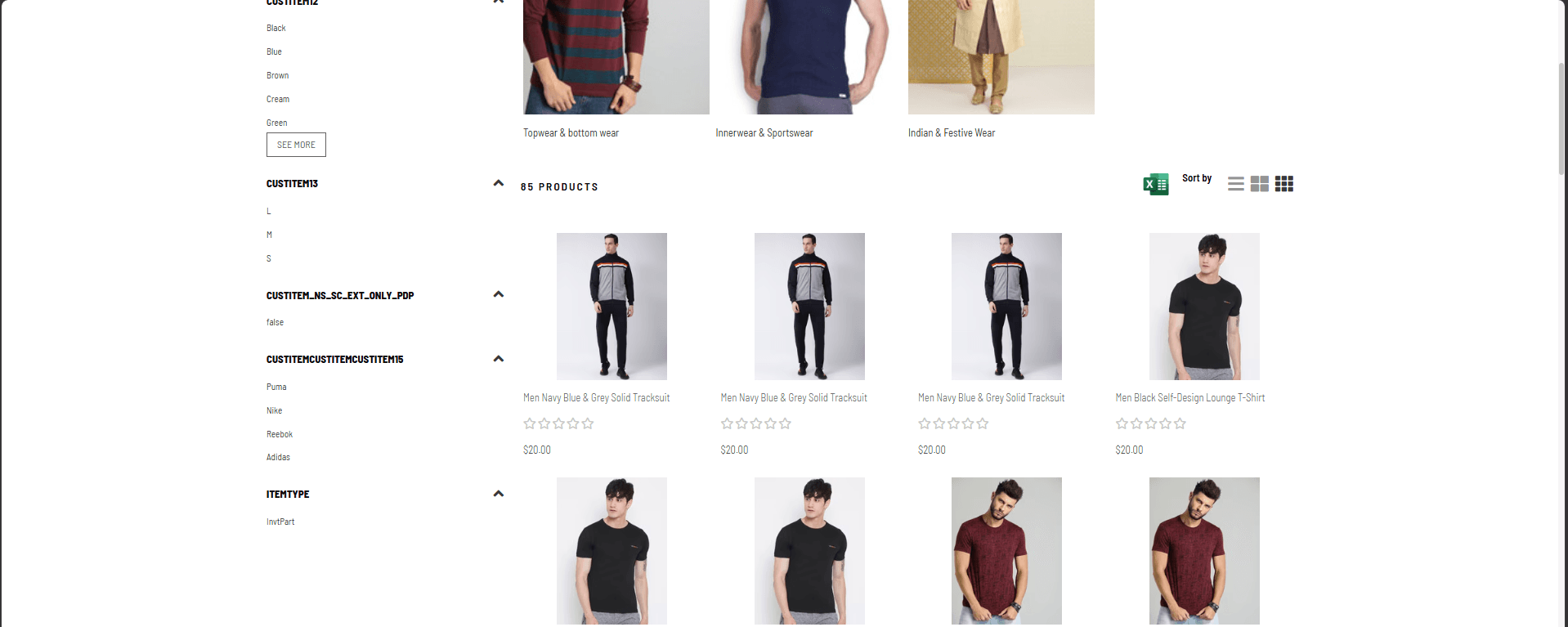
The CSV Export extension adds a one-click download option to the Product Listing Page header, allowing users to export the complete product catalogue for any category or search result as a structured CSV file. It recursively fetches all paginated results, collects key product fields, including Internal ID, SKU, name, URL, stock status, price, MSRP, quantity available, and all product images; and converts them into a clean, downloadable CSV. The export icon is only displayed to customers who are permitted to see prices, keeping sensitive data appropriately controlled.
One-Click Product Data Export from the Product Listing Page
Automatically retrieves all items across paginated results (up to 100 per request) by following pagination links, ensuring the exported CSV always contains the complete product set, not just the currently visible page.
Each exported row includes Internal ID, UPC, SKU, Product Name, Product URL, Stock Status, Price, MSRP, Quantity Available, and dynamically numbered image URLs (ImageUrl1, ImageUrl2, …) for every product image on record.
The download icon is shown only when the logged-in customer profile is permitted to see prices, preventing sensitive pricing data from being exported by restricted or guest users.
Automatically names the downloaded file using the active category name (e.g. Items_Tools_Items_Search.csv) or falls back to a generic name for search result pages, keeping exported files clearly identified.
Integration Scope & Requirements
- "The extension must be activated within your SuiteCommerce Extension Manager before the export icon appears on the PLP.
- Applicable only for SuiteCommerce and SuiteCommerce Advanced (SCA) websites.
- Requires the fieldset 'details' to be available in your searchApiMasterOptions.Facets configuration for full data export.
- The export icon is only visible to customers whose profile permits price visibility; hidden for guest or restricted users.
- Compatibility may vary if custom PLP header templates override the facets-facet-browse-list-header element."
Streamlined Product Data Access for Teams and Shoppers
- Exports all products from the entire category or search result, not just the visible page, by following pagination automatically.
- Includes all key product attributes and every product image URL in a single structured file.
- Data is fetched using the 'details' fieldset, ensuring richer product information than the default listing view.
- Export button is only rendered for price-authorised users, protecting sensitive pricing data.
- No backend or admin access is required by the end user to generate the export.
- File downloads happen entirely client-side, with no server storage of exported data.
- Eliminates manual product data gathering for merchandising, catalogue management, or third-party feed preparation.
- Context-aware file naming keeps exports organised and traceable.
- Supports multi-image exports with dynamically expanding image columns.
- Mounts directly to the existing PLP component with no template modifications required.
- Single activation toggle via the SuiteCommerce Extension Manager.
- Responsive styling ensures the export icon is properly positioned on both desktop and mobile viewports.
Frequently Asked Questions
The export includes Internal ID, UPC, SKU, Product Name, Product URL, Stock Status (InStock/OutOfStock), Price, MSRP, Quantity Available, and all product image URLs (ImageUrl1, ImageUrl2, etc.), dynamically expanded to cover the maximum number of images across all products in the listing.
All products. The extension uses a recursive fetch mechanism that follows pagination links and retrieves up to 100 items per request until all products in the category or search result are collected, regardless of how many pages the listing spans.
The export icon is only displayed to customers whose profile is configured to show prices. Shoppers with restricted or guest profiles that hide pricing will not see the export button.
Yes. The CSV Export extension supports both SuiteCommerce and SuiteCommerce Advanced (SCA) environments and is deployed through the standard SuiteCommerce Extension Manager.
The complete setup and configuration typically take between 3 to 5 business days, depending on your store's existing PLP customisations and facet configuration.
See what all the talk is about

It has been a pleasure working with the Jobin and Jismi team. Your professionalism, responsiveness, and commitment to delivering high-quality services have been commendable. Your team has consistently delivered outstanding results with efficiency and attention to details. The support has added real value to our operations. We look forward to continuing our collaboration on future projects.

The team responded thoroughly and in a detailed way to understand our needs. Their communication was excellent throughout, keeping us consistently updated from start to finish. They provided expert-level NetSuite development tailored to our complex business use cases, while also customizing a new Magento instance to meet our unique requirements. The new website now handles high traffic and provides greater visibility. We found Jobin & Jismi to be easy to work with, highly knowledgeable, and incredibly professional.


We have been working with Jobin & Jismi since 2023. What began as a project for customizing our NetSuite Advanced PDF forms has evolved into a full-service development partnership.
J&J has extended the functionality of many of our existing customizations, as well as created many new customizations across the spectrum of complexity. They have always delivered what was requested. Regular communication, a skilled team, and always being willing to work with us on improving our collaboration processes are the reasons it's easy for me to recommend J&J.


Jobin & Jismi's outstanding project management skills are a unique aspect of their service. What stood out most about Jobin and Jismi was their exceptional commitment to excellence and customer satisfaction. Their level of expertise and professionalism in handling our NetSuite ERP implementation was truly impressive. The team was consistent in meeting project milestones, and their commitment to deadlines allowed us to experience the benefits of the new system sooner than anticipated.


We have worked with Jobin and Jismi IT on a few projects involving NetSuite and Celigo integrations, and our experience has been very positive. The projects were delivered within our budget and aligned well with our expectations. Their team is highly knowledgeable, responsive, and easy to work with. They helped us implement solutions significantly faster than we would have been able to accomplish internally. We would not hesitate to work with them again in the future.

Pure Care has partnered with J&J for over 10 years for NetSuite/IT support. They are a great company to work with, providing timely solutions. They are always available to hop on a call in the late hours of night or early hours of the morning when something needs resolving urgently.


We have been working with Jobin and Jismi for several years now, and their support for our NetSuite environment has been consistently reliable and high-quality. Their team is consistently responsive, knowledgeable, and professional. Whether it's day-to-day troubleshooting or assistance with new developments, they always deliver timely and effective solutions. Their deep understanding of NetSuite and commitment to client success have made them an invaluable partner in our business operations.


Jobin & Jismi came on board at a critical moment — two system integrations were in final UAT when our SuiteSuccess contract expired and NetSuite proposed a significant cost increase to continue. Their team ramped up quickly, resolved outstanding issues, managed retesting, and shepherded both projects through sandbox-to-production migration without missing a beat. Both integrations went live successfully and on time.
What began as a rescue engagement has grown into an ongoing partnership we rely on. From automations and custom reporting to feature rollouts and release impact analysis, J&J consistently delivers detailed, high-quality work with transparent project management. Our lead engineer and primary point of contact, Anila George, exemplifies everything we value in a partner — organized, thorough, and genuinely responsive.
For any NetSuite team evaluating support partners, I'd recommend Jobin & Jismi without hesitation.


We have worked with Jobin and Jismi consultants since November of 2024. They have served as a crucial technical expert in the customization of our NetSuite invoicing and integrated pdf creation. Even more importantly, they were crucial in the development of a tariff tracking tool that allowed us to implement line-item surcharges. Their work was quick and timely enough for us to have a system of capturing added fees in a stressful time frame. We could not have done this on our own and were not prepared to pay the cost of added contracts with our ERP provider. Jobin and Jismi have a great team who can drill into the details of a production account and do the work without disrupting the rest of the work environment.