

Automated SOW Capture & Billing Summary
Automate the capture of Statement of Work (SOW) metadata and streamline billing processes in NetSuite. Ensure accurate resource allocation, time tracking, and billing directly from project SOWs.
- SKU :PDNSSOW01
- Last Update :September 2025
- Support for :NetSuite
- Implementation time :3 Business Days
Automated SOW Capture & Billing Summary
Automated SOW Metadata Capture and Billing
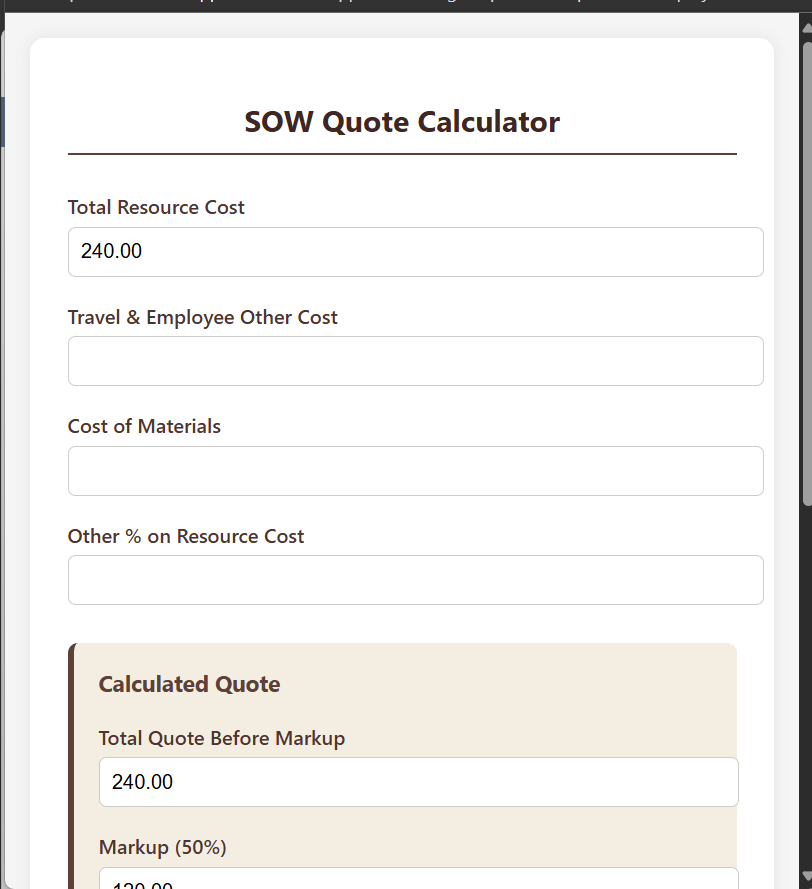
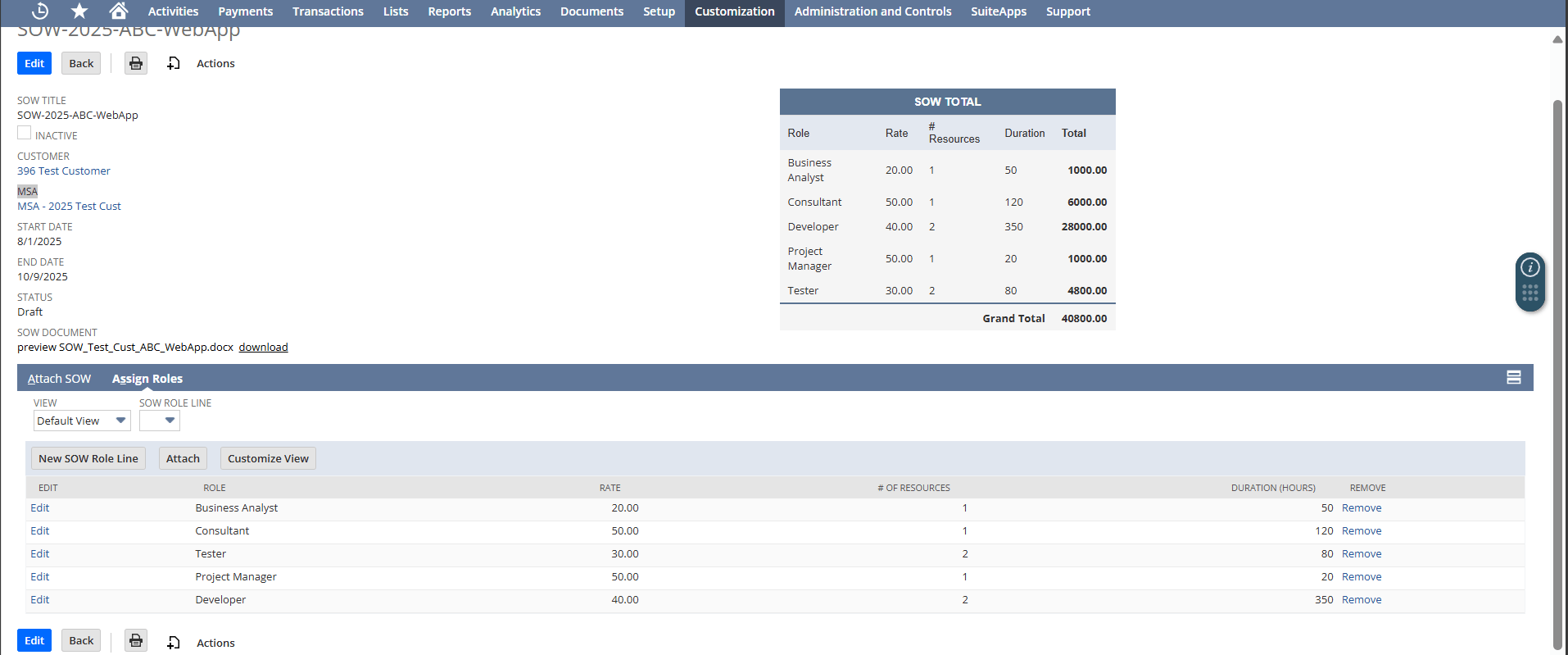
This solution includes a fully featured calculator for labor costs, material costs, markup calculations, and invoice generation, ensuring automated billing and improved accuracy. Invoices or billing schedules can be generated directly from this data, reducing errors and manual work. This also adds a custom summary box on the parent SOW record, aggregating metadata from child role-line records. It calculates totals by role (rate × resources × duration) and displays a consolidated view of project scope and billing values.
Custom SOW Metadata Capture & Billing
Define role-based rates, resource counts, and durations directly on SOW line items.
Aggregates totals by role and overall project total for instant visibility on the parent record.
Supports status-based approval workflows, ensuring that billing occurs only for approved SOWs. Enhances project oversight and avoids unapproved billing.
The integrated calculator supports detailed cost calculations, including Labor Cost Calculation, Material Cost Calculation, Overhead and Additional Costs and Markup & Margin Calculation
Usage Requirements and Limitations
- Appropriate access permissions are required for resource tracking functionalities.
- Roles, rates, and resources must be configured for accurate calculations.
- Only standard rate × duration billing models are supported out-of-the-box.
- Custom billing rules may require additional tailoring.
Streamline SOW-to-Billing
- Eliminate manual spreadsheets.
- Automate invoice generation.
- Save admin time on reconciliations.
- Ensure invoices reflect approved scope.
- Real-time calculation of totals.
- Minimize under/over billing.
- Provide clear roll-ups for managers.
- Enable faster approvals.
- Instantly computes labor, material, and overhead costs based on SOW metadata like role, rate, and duration.
- Dynamically updates project margin and markup percentages as data changes, supporting informed pricing decisions.
- Enhances visibility and transparency with a live summary box that aggregates total project cost by role and billing amount.
- Works with multiple SOWs per customer.
- Supports subsidiaries/projects.
- Easily extendable for industry-specific rules.
Frequently Asked Questions
Yes, each role can have its own rate, resources, and hours, with totals aggregated at the parent record level.
Yes, billing schedules can be milestone-based, time-based, or fixed-fee, depending on configuration.
Invoices generated link directly to NetSuite projects for reporting and revenue recognition.
The summary box is customized to display fields such as role, rate, and hours. Additional fields or changes can be implemented as part of the customization scope.
Yes, approval workflows can be configured so only approved SOWs move into billing automation.
The SOW automation supports time-based, milestone-based, and fixed-fee billing models, with billing values derived directly from approved SOW roles, rates, and durations. This ensures that invoices and billing schedules accurately reflect the agreed scope of work while maintaining consistency across project delivery and finance teams.
Billing automation tightly integrates with NetSuite’s workflow statuses. Only SOWs that have progressed to an approved status are eligible for invoice or billing schedule generation.
SOW Capture focuses on capturing and structuring Statement of Work details, such as roles, rates, and durations. AP Bill Capture, on the other hand, is designed for processing vendor invoices and managing accounts payable, supporting supplier payments rather than customer billing.