

Vendor Credit Limit Handling Per Location
Enforce monthly vendor credit limits per location directly within NetSuite Purchase Orders. This solution alerts users and blocks PO creation or updates when a vendor’s spending exceeds the predefined limit, ensuring controlled and compliant procurement.
- SKU :PDNSVCL01
- Last Update :December 2025
- Support for :NetSuite
- Implementation time :5 Business Days
Vendor Credit Limit Handling Per Location
Vendor Credit Limit Enforcement for NetSuite Purchase Orders
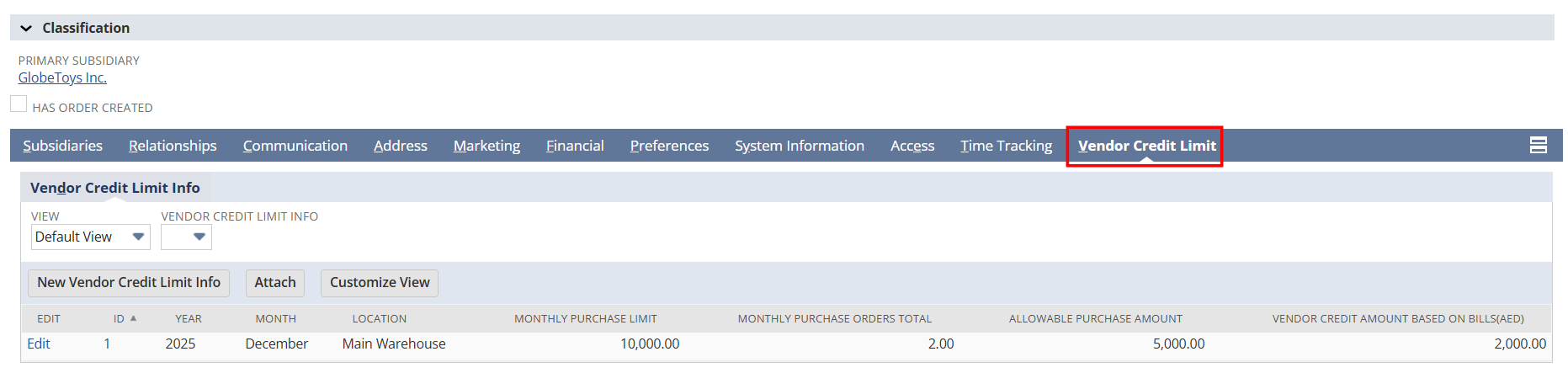
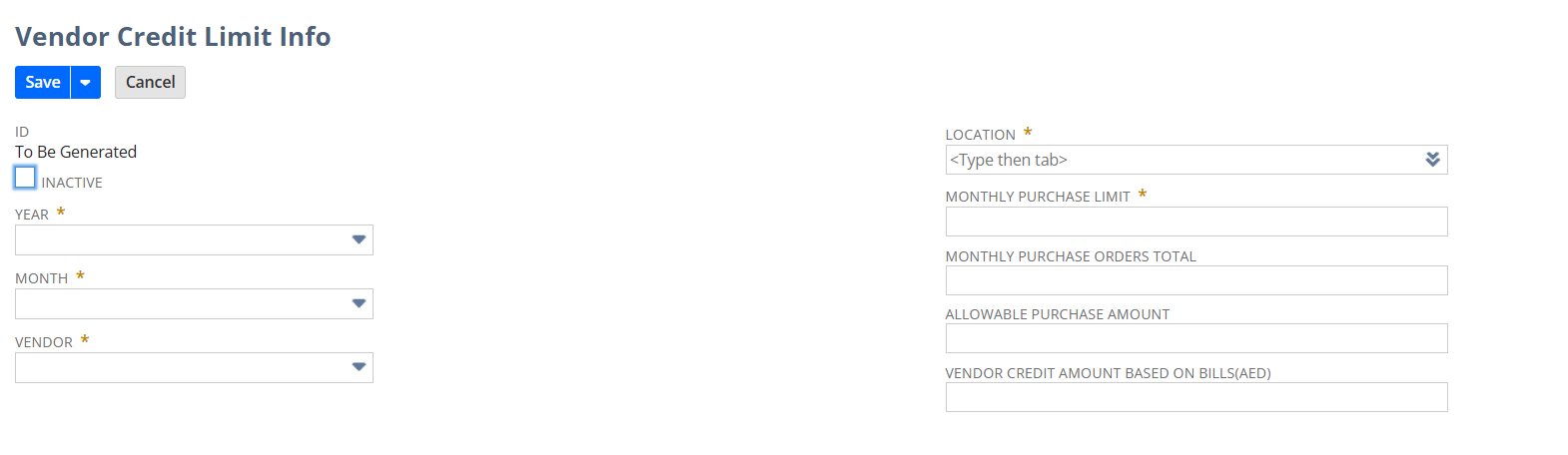
This solution enforces monthly vendor credit limits per location in NetSuite, validating Purchase Orders against set limits and blocking those that exceed them. A custom record tracks limits, and scheduled scripts update monthly totals to maintain spending control and reduce financial risk.
Automated Vendor Credit Limit Validation
Tracks each vendor’s monthly purchase limit and compares it against actual spending for the selected location. Ensures accurate monitoring by updating purchase totals automatically through scheduled scripts.
Enforces vendor credit limits based on the specific location selected on the Purchase Order. Prevents overspending by validating the PO amount against the remaining limit for that location.
Validates Purchase Orders instantly at the time of entry, ensuring the vendor’s remaining credit limit is not exceeded. Provides immediate feedback to users, preventing overspend before the PO is saved.
Automatically recalculates each vendor’s monthly credit usage to ensure accurate limit validation. Keeps Purchase Order checks reliable by refreshing spend totals on a scheduled basis.
Requirements and Considerations
- Credit limit validation applies only to Purchase Orders using supported locations.
- Monthly spend totals rely on scheduled script execution and may not update in real time.
- Vendors must have a defined credit limit record for validation to occur.
- Customizations or third‑party scripts affecting PO amounts may impact validation accuracy.
- Users require appropriate permissions to view or edit vendor credit limit records."
Improved Spend Control & Procurement Compliance
- Provides tighter control over vendor spending by enforcing credit limits at the PO level.
- Reduces financial risk by preventing unapproved or excessive purchases before they occur.
- Improves compliance with internal procurement policies through consistent, automated checks."
- Minimizes the risk of exceeding vendor credit limits by enforcing checks before PO approval.
- Helps maintain financial stability by preventing unplanned or unauthorized spending.
- Supports consistent compliance with internal credit control policies."
- Ensures consistent adherence to procurement policies by enforcing vendor credit rules at every PO.
- Reduces manual oversight by automating compliance checks across all supported locations.
- Strengthens audit readiness through standardized, system‑driven validation."
- Ensures monthly credit usage remains accurate through automated recalculations.
- Reduces manual effort and errors by keeping vendor spend data consistently up to date.
- Improves decision‑making with reliable, refreshed credit visibility each month."
Frequently Asked Questions
The system checks the vendor’s defined credit limit and compares it against the total of the new Purchase Order plus the vendor’s current monthly spend. If the limit would be exceeded, the PO is blocked from approval.
Monthly vendor credit usage is calculated by summing all approved Purchase Orders for that vendor within the current month. A scheduled script refreshes these totals to ensure accuracy.
If a Purchase Order exceeds the vendor’s credit limit, the system blocks it from being approved. The user is notified so they can adjust the PO or update the vendor’s credit settings.
Yes, vendor credit limits can be updated at any time by authorized users. Any changes take effect immediately and are applied to all future Purchase Order validations.
Only approved Purchase Orders created within the current month are included in the monthly credit calculation. Draft or rejected POs are excluded from the totals.