

Work Order Traveler Barcode Scanning Page
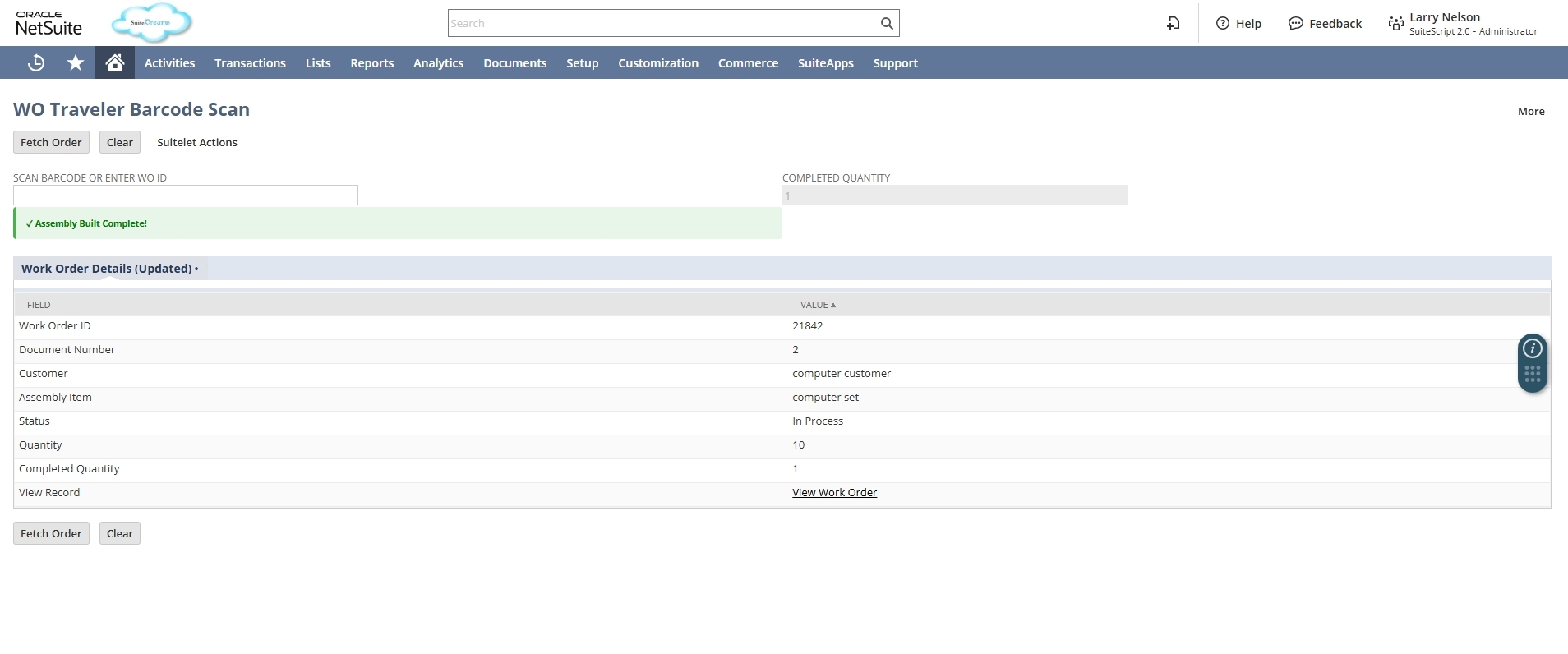
The WO Traveler Barcode Scan page automates the process of scanning Work Order barcodes, fetching order details, and marking Work Orders as complete by creating Assembly Build records directly inside NetSuite.
- SKU :PDNSWOB01
- Last Update :February 2026
- Support for :NetSuite
- Implementation time :3 Business Days
Work Order Traveler Barcode Scanning Page
NetSuite–Work Order Traveler Barcode Scan Page
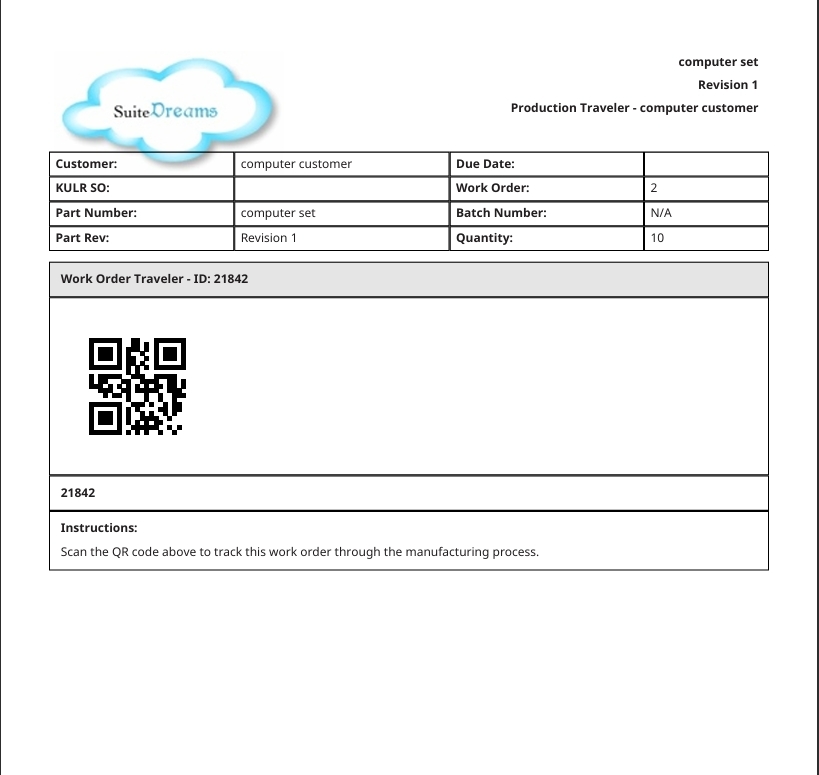
Implements a barcode‑driven interface for Work Orders that allows operators to scan traveler documents, retrieve Work Order details, and record completion quantities. The solution supports both full and partial completions, automatically creating Assembly Build records and updating Work Order status.
Work Order Traveler Barcode Scanning in NetSuite
A dynamic input field allows operators to record actual built quantities, supporting both full and partial completions. Validation rules prevent incorrect entries, ensuring accurate production reporting.
The page automatically generates Assembly Build records linked to the Work Order once completion is confirmed. This provides real‑time updates to inventory and production status without manual intervention.
Operators can scan traveler barcodes to instantly retrieve Work Order details, eliminating manual searches and reducing errors. This ensures faster access to production data directly within NetSuite.
State is maintained between form submissions using hidden fields, ensuring continuity of data during user interactions. This improves usability and prevents data loss during multi‑step workflows.
Requirements and Considerations
- Work Order Eligibility – Only open and valid Work Orders with defined Assembly Items can be processed; closed or cancelled orders are excluded.
- Quantity Validation – Completed Quantity must be greater than zero and cannot exceed the Input Quantity; invalid entries are blocked.
- Partial Completion Handling – If Completed Quantity is less than Input Quantity, the Work Order remains open and flagged as partially complete until full completion.
- User Permissions – Operators must have appropriate NetSuite permissions to update Work Orders and create Assembly Build records.
- Environment Requirements – Work Orders, QR code generation, and Locations must be enabled in NetSuite for the solution to function correctly.
Key Benefits of Work Order Traveler Barcode Scanning Page
- The page simplifies shop floor operations by allowing operators to scan Work Order barcodes and instantly retrieve details.
- Reduces manual searches and consolidates multiple steps into one guided interface, saving time and effort.
- Operators can record actual built quantities even if they are less than the input quantity, ensuring flexibility in production runs.
- Work Orders remain open for iterative updates until full completion, enabling accurate staged tracking.
- Validation rules prevent invalid entries such as negative values or quantities exceeding the input quantity.
- Automated checks reduce manual mistakes, ensuring reliable production and inventory data across all records.
- Assembly Build records are created automatically and linked to Work Orders, updating inventory and production status in real time.
- All actions are logged for compliance and traceability, providing a complete audit trail for operational transparency.
Frequently Asked Questions
The page resets and any previously scanned details are removed. You can then scan a new Work Order barcode to start fresh.
Yes. Completed Quantity can be less than Input Quantity. The Work Order remains open until fully completed.
The system will block the entry and show an error message. This ensures that you cannot record more than the actual Work Order quantity.
They are automatically generated when “Mark Complete” is triggered, linked to the Work Order ID.
Yes, all actions such as scanning, clearing, and marking completion are logged. This provides a full audit trail for traceability and operational transparency.