

The Complete NetSuite Implementation & Go-Live Checklist for 2026
May 27,2026



In a digital-led business world, the right management systems shape how a company works and grows. Platforms like NetSuite have become the central nervous system of modern enterprises, connecting processes like finance, operations, sales, and data under one unified ecosystem. When implemented correctly, this system turns scattered processes into a synchronized engine where decisions are faster, visibility is sharper, and growth feels intentional rather than reactive.
However, simply switching on NetSuite doesn’t unlock its potential. The real difference lies in how well it is implemented.
Implementing NetSuite is less like installing software and more like orchestrating a full-scale business transformation. Every department, every workflow, every data point gets pulled into the spotlight. When done right, it becomes a powerful engine that drives visibility, efficiency, and growth. When done poorly, it leads to delays, rework, and frustrated teams.
That is where a well-structured implementation and go-live checklist is essential. It acts like a flight control system, guiding your organization from early planning to final launch and verifying that you overlook no detail. From defining business goals to validating data, from configuring workflows to training users, each step plays a role in turning complexity into clarity.
This blog guides users through each phase of a NetSuite implementation, helping you move from planning to stabilization with confidence and control.
Why NetSuite Projects Go Off Track?
Before diving into the checklist, it helps to understand where Oracle NetSuite implementations often struggle. In most cases, the issue is not the platform itself. NetSuite ERP is robust, scalable, and designed to handle complex business needs. The real challenges arise from how the project is planned and executed. When requirements are unclear, expectations shift midway, or teams rush through critical phases, even a powerful system can feel difficult to manage.
Research from Gartner reveals that by 2027, more than 70% of recent ERP implementations will fail to fully meet their original business goals, with as many as a quarter failing catastrophically, highlighting how even well-funded projects can fall short. Without a structured approach, small gaps early on can quietly grow into larger issues by the time you reach go-live.
These challenges typically show up in practical ways, such as shifting project scope, inconsistent or unclean data, limited involvement from key stakeholders, and insufficient testing or user preparation before go-live. When these aspects are overlooked, the implementation loses direction, and teams often react to issues instead of preventing them. This is where a well-defined checklist becomes essential, providing structure, clarity, and control at every stage, keeping the project aligned and progressing smoothly toward a successful go-live.
NetSuite Pre-Implementation Planning
Confirm Readiness
Before starting a NetSuite implementation, organizations need a clear view of their operational and organizational readiness. This goes beyond technical preparation and examines whether leadership is in sync, teams will actively participate, and business processes are properly documented. A realistic understanding of timelines and budgets is equally important, especially as implementations today often involve cross-functional collaboration and change management. When readiness is not assessed early, projects tend to slow down midway due to unclear ownership and delayed decision-making.
Define Business Goals
A successful NetSuite implementation is guided by clear business objectives and not just system setup. Organizations are increasingly using ERP systems to improve agility, real-time visibility, and automation across functions. This means goals should be measurable and tied directly to business impact, such as faster financial close cycles, improved inventory accuracy, or streamlined order processing. Well-defined goals act as a reference point throughout the project, guiding configuration choices and helping measure success after go-live.
Lock Scope and Requirements
Once goals are defined, the next step is to establish a clear and controlled scope. This involves documenting both functional and technical requirements in detail, while also distinguishing between essential features and future enhancements. Modern implementations benefit from structured change-control processes, where any new requests are evaluated before being added. Without this discipline, scope can expand quickly, leading to delays, increased costs, and implementation fatigue. A well-locked scope keeps the project focused, predictable, and easier to execute.
NetSuite Data Preparation and Migration
Data Audit
Before migrating data into NetSuite, organizations need a clear understanding of their existing data landscape. This involves identifying all data sources, assessing the quality and completeness of data, and eliminating redundant or outdated systems. Data quality plays a major role in ERP success, with 41% of projects experiencing delays due to data-related issues. With businesses today relying heavily on real-time reporting and analytics, even small data inconsistencies can lead to larger operational issues later. Gartner’s research shows that poor data quality costs organizations an average of USD 12.9 million annually. Conducting a thorough data audit at this stage helps create a reliable foundation, verifying that only relevant and accurate information is carried forward into the new system.
Data Cleansing
Clean and structured data plays a critical role in the success of any ERP implementation. This step focuses on removing duplicate records, standardizing formats across datasets, and correcting inaccuracies that may have accumulated over time. As organizations scale and handle larger volumes of data, maintaining consistency becomes even more important for reporting and automation. Proper data cleansing not only improves system performance but also builds trust among users who rely on accurate information for decision-making.
Migration Strategy
Once the data has been audited and cleaned, the next step is to define a clear migration strategy. This includes deciding whether to migrate full historical data or only opening balances, as well as choosing between a one-time migration or a phased approach. Establishing validation checkpoints throughout the process is essential to ensure accuracy and completeness. Data migration and integration challenges are among the leading causes of ERP implementation delays. In modern implementations, multiple test migrations are often conducted before the final move to minimize risks and avoid disruptions during go-live. A well-planned migration strategy ensures a smoother transition and reduces the chances of data-related issues post-implementation.
NetSuite System Configuration and Setup
Configure Workflows
One of NetSuite’s biggest strengths is its flexibility in adapting to different business processes. During this stage, workflows should be configured to reflect how the organization operates across functions such as approvals, financial processes, and order-to-cash cycles. In Oracle NetSuite, approval workflows and automated alerts are typically built using SuiteFlow, NetSuite's point-and-click workflow engine, with SuiteScript adding code-level extensions where business logic goes beyond what a no-code workflow can handle. This combination automates approvals, triggers notifications, and enforces process controls without manual intervention.
As businesses lean harder on automation to improve efficiency, it is important to design workflows that are practical and easy to manage. Overcomplicating configurations can create confusion for users and make future changes more difficult, so keeping workflows simple and aligned with actual business needs leads to better usability and adoption.
Align with Approved Scope
As configuration progresses, it is essential to ensure that all setups remain aligned with the initially defined scope and requirements. This keeps the project focused and prevents unnecessary deviations that quietly extend the project timelines. NetSuite offers extensive customization capabilities, but modern implementation practices encourage using standard features wherever possible to maintain system stability and ease of maintenance. Staying within scope not only controls costs and timelines but also results in a more efficient and manageable system over the long run.
Set Roles and Permissions
Defining roles and permissions is a critical step in balancing system security with usability. This involves setting up role-based access so that users can perform their tasks without being exposed to unnecessary or sensitive information. With increasing emphasis on data security and compliance, organizations must ensure that access controls are carefully planned and implemented. Well-structured roles protect business data and improve user experience by surfacing only the information each role needs, which makes the system easier and more intuitive to use.
NetSuite Testing and Quality Assurance
Functional Testing
Functional testing focuses on verifying that each configured feature in NetSuite works as expected within individual modules. This includes validating financial transactions, inventory movements, and reporting outputs to ensure accuracy and consistency.
For Indian deployments, this stage carries extra weight on the tax side. If tax has been configured using SuiteTax with the India Localization SuiteTax Engine, GST calculation rules need to be validated against real transaction scenarios. Test invoices, purchase orders, and cross-border transactions to confirm that taxes are calculated accurately and that the e-invoice JSON is accepted by the IRP (Invoice Registration Portal).
As businesses increasingly rely on automated processes, it is important to confirm that every function performs correctly under normal conditions. Identifying and resolving issues at this stage helps prevent operational disruptions later and builds confidence in the system before broader testing begins.
Performance and Load Testing
Beyond functionality, the system must be able to handle real-world usage conditions. Performance and load testing evaluate how NetSuite responds under high transaction volumes and concurrent user activity. This involves simulating peak business scenarios to assess system speed, stability, and responsiveness. In modern implementations, where scalability is critical, this step ensures that the system can support growth without performance bottlenecks or slowdowns during critical operations.
End-to-End Validation
End-to-end validation brings all components together by testing complete business processes across departments. This involves running real-life scenarios such as order-to-cash or procure-to-pay cycles and ensuring that data flows seamlessly between functions. ERP implementations are often significantly larger and more complex than typical IT projects, increasing the risk of failure without proper ERP testing. The goal is to confirm that integrations, workflows, and configurations work cohesively in a live-like environment. This stage acts as the final checkpoint before go-live, so that the system is fully aligned with business operations and ready for deployment.
NetSuite User Training and Adoption
Role-Based Training
Effective training is essential for ensuring that users can confidently work within NetSuite from day one. Since different teams interact with the system in different ways, training should be tailored to specific roles such as finance, sales, operations, warehouse, and so on. This approach helps users focus on the features and workflows most relevant to their responsibilities. Organizational change management and user adoption are among the most critical factors influencing ERP success. Moreover, in today’s environment, where user adoption directly impacts ROI, role-based training improves efficiency, reduces errors, and accelerates the transition to the new system.
User Onboarding
A smooth onboarding process helps users adapt quickly to NetSuite and reduces resistance to change. This includes providing hands-on training sessions, guided walkthroughs, and access to sandbox environments where users can practice without affecting live data. As organizations adopt more digital tools, structured onboarding becomes critical in helping teams build familiarity and confidence. Proper onboarding makes sure that users are not only trained but also comfortable navigating the system in real-world scenarios. Lack of user adoption remains one of the top reasons ERP systems fail to deliver ROI.
Documentation
Clear and accessible documentation supports users long after initial training is completed. This includes process guides, FAQs, and troubleshooting resources that users can refer to whenever needed. In modern ERP environments, where systems evolve, maintaining updated documentation is essential for consistency and knowledge sharing. Well-documented processes reduce dependency on support teams, empower users to resolve issues independently, and contribute to smoother day-to-day operations.
NetSuite Go-Live Preparation
Final Validation
Before going live, organizations must perform a final round of validation to confirm that everything is functioning as expected. This includes verifying data accuracy, reviewing system configurations, and ensuring that integrations are stable and working correctly. At this stage, the focus is on catching any last-minute inconsistencies that could impact operations. A thorough validation process helps reduce uncertainty and ensures that the system is ready to support real business activities from day one.
Backup Plans
Even with careful planning, unexpected issues can arise during go-live. Having well-defined backup plans in place helps organizations respond quickly without disrupting operations. This may include rollback strategies, temporary workarounds, and clearly defined escalation paths for critical issues. According to ITIC's 2024 Hourly Cost of Downtime survey, 90% of firms report that a single hour of downtime costs over USD 10,000, and 41% of enterprises peg hourly downtime cost at over USD 1 million to USD 5 million. Contingency planning provides an added layer of security and confidence during the transition.
Go-Live Readiness Checklist
Go-live is the final checkpoint before cutover. Before switching to the live environment, organizations should complete a structured readiness review to reduce risks and avoid operational disruptions during launch. The following seven checkpoints are critical before proceeding with deployment:
Data Migration Validation: Confirm that all business data has been successfully migrated and reconciled against source systems to maintain accuracy and consistency.
Integration Testing Completion: Verify that integrations with external platforms, applications, and third-party systems have been tested end-to-end and are functioning correctly.
User Acceptance Testing (UAT) Sign-Off: Ensure business users across every affected department have completed and approved User Acceptance Testing based on real operational scenarios.
Role-Based User Training: Confirm that all users have completed role-based training within the sandbox environment and are comfortable using the system before launch.
Cutover Plan Approval: Review and approve the complete cutover strategy, including the data freeze date, opening balance upload process, and rollback triggers in case issues arise after deployment.
Post-Go-Live Support Readiness: Make sure a dedicated support team is briefed and available during the first 48 to 72 hours after launch to quickly address issues and stabilize operations.
Leadership and Department Alignment: Obtain final confirmation of the go-live date from leadership and all department heads to keep teams aligned during the transition.
For organizations using a SuiteSuccess edition, much of the readiness effort is reduced upfront. SuiteSuccess provides pre-configured, industry-specific workflows, dashboards, KPIs, and reports built around leading practices, helping reduce configuration effort and accelerate deployment timelines. However, even with these built-in accelerators, the same go-live readiness checks remain essential for a stable and successful deployment.
NetSuite Go Live and Stabilization
Launch Execution
Go-live marks the transition from planning to real-time operations, where the system begins supporting actual business activities. At this stage, it is important to closely monitor system performance, track user interactions, and identify any immediate issues that may arise. Since this is the first live exposure to real data and workflows, maintaining visibility and responsiveness is critical. A well-managed launch execution produces a smoother transition and minimizes disruptions during the early days.
Issue Handling
It is common for minor issues to surface once the system is live, even after thorough testing. The key is to manage these issues in a structured and timely manner. This involves logging problems systematically, prioritizing them based on business impact, and resolving them efficiently. A proactive approach to issue handling prevents small concerns from escalating into larger operational challenges and helps maintain stability during the early stages of adoption.
Initial Support
Providing strong support immediately after go-live is essential for building user confidence and ensuring continuity. This typically includes having dedicated support teams available to assist users, along with clearly defined response mechanisms for addressing queries and issues. In modern implementations, where user experience plays a major role in adoption, timely and effective support helps teams adapt quickly and continue operations with minimal disruption. The first few weeks after go-live are particularly important, as they set the foundation for long-term system acceptance and success.
NetSuite Post-Go-Live Optimization
Continuous Improvement
A NetSuite implementation does not end at go-live; it evolves as the business grows and adapts to new demands. This phase focuses on identifying areas for improvement based on real system usage and feedback from users. As organizations continue to refine their processes, workflows can be adjusted to improve efficiency, eliminate bottlenecks, and better align with business objectives. Organizations that actively optimize ERP systems post-go-live achieve stronger long-term performance and ROI.
Performance Monitoring
Ongoing performance monitoring is essential to ensure that the system operates efficiently and delivers accurate insights. This involves regularly reviewing report accuracy, system responsiveness, and overall user adoption across departments. In today’s data-driven environment, even minor inconsistencies can impact decision-making, making it important to maintain visibility into system performance. Regular monitoring helps identify potential issues early and supports a stable, high-performing ERP environment.
Feature Enhancements
As business needs evolve, NetSuite’s capabilities can be expanded to support new requirements and opportunities. This includes introducing additional modules, automating manual processes, and enhancing reporting capabilities to gain deeper insights. In Oracle NetSuite, once the system is stable, organizations can further extend functionality through the SuiteApp Marketplace, which offers 700+ curated third-party applications and customizations built to integrate seamlessly with the core ERP. Modern ERP systems are designed to scale, and leveraging these extensions allows organizations to continuously improve productivity and decision-making. A well-optimized system not only supports current operations but also adapts to future growth with ease.
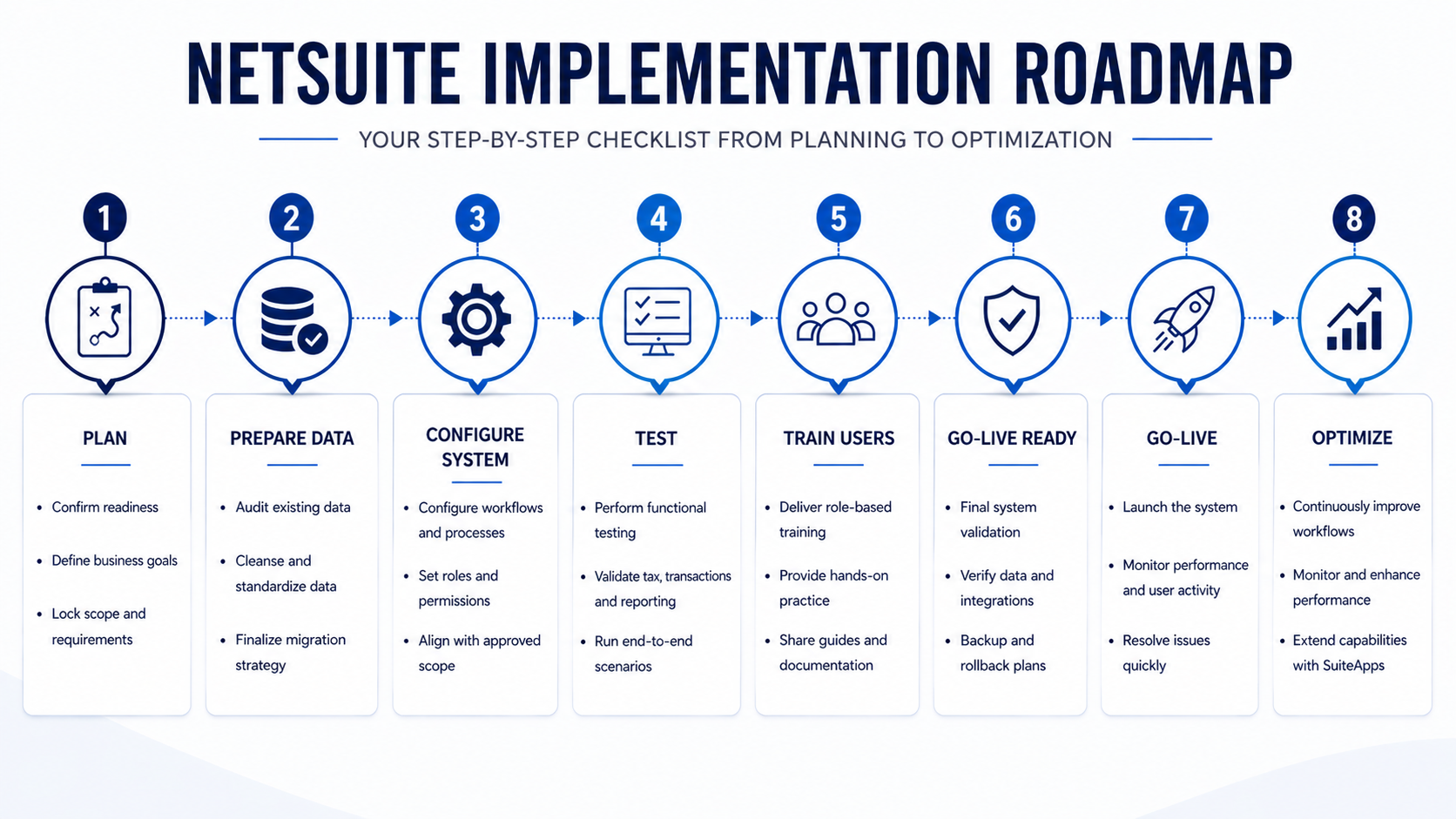
NetSuite Implementation at a Glance: Visual Checklist
After navigating each phase in detail, it helps to step back and see the entire journey as one connected flow. An infographic-style checklist brings together every stage of an Oracle NetSuite implementation into a clear, visual sequence, making it easier to track progress, communicate with stakeholders, and identify dependencies between phases. From pre-implementation planning to post-go-live optimization, this visual guide acts like a map you can glance at anytime, keeping the project aligned, structured, and on course. Here’s how it looks:
Choosing the Right Platform and Partner - Why Jobin & Jismi?
A successful NetSuite implementation is not just about completing the go-live but about building a system that continues to support and scale with your business. From planning and data preparation to stabilization and optimization, every phase in the implementation process plays a role in shaping long-term success. This is critical for most businesses in the modern world, where operational complexity and multi-currency transactions demand precision, control, and adaptability.
Jobin & Jismi stands as one of the leading global providers of Oracle NetSuite solutions. We offer extensive expertise in NetSuite Implementation, NetSuite Customization, NetSuite Integration and are a certified Oracle NetSuite Solution Provider Partner, with 100+ successful implementations. We have successfully assisted clients across diverse industries with NetSuite implementation, such as manufacturing, retail, financial services, and more, and bring both technical expertise and domain understanding to every project. We take a methodical implementation approach, along with end-to-end support, that helps businesses navigate challenges with clarity and confidence.
By aligning technology with business processes, we encourage companies to make the right decisions, maintain operational control, and scale efficiently. With the right strategy and expertise from Jobin & Jismi, NetSuite becomes a strong foundation for sustained growth.
Let our team help you implement NetSuite with the right configurations. Contact us today to get started and build a system that supports your growth from day one.
Frequently Asked Questions
What is a NetSuite implementation checklist?
A NetSuite implementation checklist can be defined as a structured guide outlining all key steps required to deploy the ERP successfully.
How long does a NetSuite implementation take?
Implementation timelines vary based on business size and complexity. Small- to mid-sized businesses (up to 50 users) typically go live within 8 to 16 weeks, while mid-market organizations (50 to 250 users) may take 16 to 32 weeks. Larger enterprise deployments, especially those involving multiple entities or subsidiaries, can range from 24 to 52 weeks. Factors such as data migration quality, integration complexity, user readiness, and stakeholder availability can influence the overall timeline.
What are the key phases of a NetSuite implementation?
The main phases include planning, data preparation, configuration, integration, testing, training, go-live, and optimization. Each phase builds on the previous one to form a smooth and structured deployment.
How important is data migration in NetSuite implementation?
Data migration is a critical process, as it directly impacts reporting accuracy and business operations. Clean, validated data provides reliable insights and smooth system performance after go-live.
What integrations are typically required in NetSuite?
Typical integrations required for NetSuite include CRM systems, e-commerce platforms, payment gateways, banking systems, and logistics tools.
What testing should be done before NetSuite go-live?
Pre-go-live testing must include functional, integration, performance, and end-to-end scenario validation. This is to make sure that the system works correctly under real business conditions before launch. In Oracle NetSuite implementations, this phase should also cover user acceptance testing (UAT), where key business users validate real-world workflows such as order-to-cash and procure-to-pay cycles. Testing should include edge cases, high-volume transactions, and critical areas like tax, financial reporting, and integrations with external systems. A structured testing approach helps identify gaps early, reduce risks at go-live, and build confidence across teams.
What should be verified before going live with NetSuite?
Before going live with NetSuite, seven key checkpoints should be confirmed to reduce risk and avoid disruptions during launch. These areas act as the final validation layer before cutover:
1. All data has been migrated and reconciled against source systems.
2. Integrations with external platforms have been tested end-to-end.
3. User Acceptance Testing (UAT) has been signed off by business users across all affected departments.
4. Every user has completed role-based training in the sandbox environment.
5. The cutover plan, including data freeze date, opening balance upload, and rollback trigger, has been reviewed and approved.
6. A dedicated support team is briefed and available for the first 48 to 72 hours after launch.
7. Leadership has confirmed the go-live date with all department heads.
Missing any of these checkpoints is a common reason for post-go-live issues and operational instability.
on LinkedIn