
NetSuite Site Builder and Legacy SCA End of Life 2029: What It Means and How to Plan Your Migration?



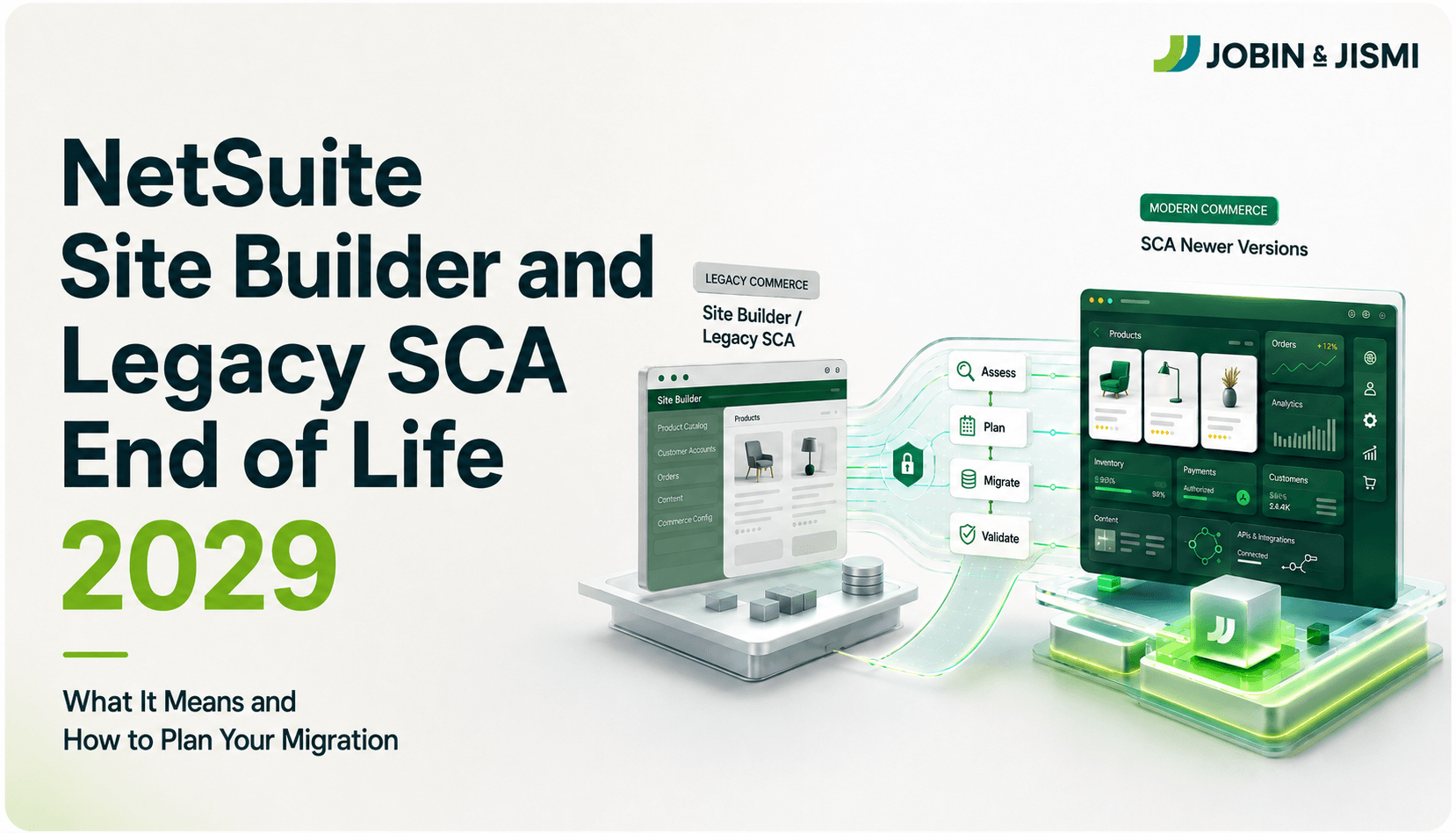
Keeping up with modern technology is essential for businesses to keep up with the pace of modern, advanced business needs. NetSuite has confirmed that the NetSuite SiteBuilder and SuiteCommerce Advanced 18.1 and older will be retired on January 30, 2029. Staying up with those legacy platforms not only restricts the future innovations of the businesses but also hinders the efficient flow of operations as NetSuite stops providing updates to these systems. Teams delaying until 2027+ face doubled costs and 6-month delays due to partner shortages, only 60% complete before the 2029 deadline.
Which Products and Versions Are Affected?
The systems that are affected by the retirement are:
- Site builder
- SuiteCommerce Advanced 18.1 older versions
Staying on these legacy platforms can interrupt the efficient flow of business operations. As no further updates are provided after retirement, it impacts the storefront functionality, SEO rankings, organic traffic, integrations, and workflows. The early migration into an advanced platform helps businesses to align migration with business cycles.
What is NOT Affected by This Announcement?
The systems that are not affected by the retirement are:
- Current Version of SuiteCommerce
- SuiteCommerce Advanced Versions Newer than 18.1
They provide robust capabilities, enhancements, and are not affected by retirement. They align with the NetSuite 2026.1 release, featuring automatic updates for standard SuiteCommerce and manual migrations for Advanced. Even though there is no forced shutdown before 2029, retirement can result in performance limitations and compatibility issues.
What is NetSuite SiteBuilder and SuiteCommerce Advanced (Legacy SCA)?
NetSuite Sitebuilder
- NetSuite SiteBuilder is the legacy e-commerce platform for building webstores integrated with NetSuite ERP.
- For 10+ years, it offered prebuilt templates, shopping carts, self-service accounts, and SuiteApp integrations via the SSP platform for basic e-commerce needs.
- It is replaced by SuiteCommerce, which can provide more advanced features such as better customization, modern architecture, and stronger SEO foundations.
- It was simpler and cheaper than SuiteCommerce, ideal for small stores with limited customization.
- NetSuite recommends migrating to the new versions as they are prone to potential risks after retirement.
SuiteCommerce Advanced (Legacy SCA)
- SuiteCommerce Advanced is a mid-market e-commerce platform designed with SaaS technology as a replacement for Site Builder from 2014 to mid 2018.
- The legacy versions of SuiteCommerce Advanced suffered from outdated architecture and lacked modern features like faster checkouts, AI-driven tools, and enhanced security found in newer SCA updates.
- SuiteCommerce Advanced provides features such as omnichannel capabilities, real-time NetSuite sync, and pixel-perfect designs, outpacing standard SuiteCommerce in flexibility.
- The legacy systems are replaced by the new versions of SuiteCommerce Advanced, which offer enhanced features such as advanced customization, enhanced UI and performance, and omnichannel support.
What are the Risks of Staying on Site Builder or Legacy SCA?
Growing incompatibility with modern commerce capabilities: As the legacy systems lag behind in modern business updates, they can’t keep up with the pace of evolving customer and operational needs, and this can lead to lost revenue, customer churn, and escalating costs over time. Teams delaying until 2027+ face doubled costs and 6-month delays due to partner shortages, with only 60% complete before the 2029 deadline.
Reduced support for newer integrations and APIs: Outdated architectures and end-of-support status can lead to several risks, such as a lack of real time updation which allows businesses to keep up with real-world problems. Businesses staying on legacy platforms miss 15-25% AOV uplift from modern features. Legacy systems use older REST/SOAP endpoints incompatible with modern OAuth 2.0, webhooks, or GraphQL required by new payment processors, which leads to delayed growth of companies.
Misalignment with NetSuite's latest development frameworks: Legacy system upkeep costs 4x more than modern alternatives over 5 years. When NetSuite provides new updates for its users to keep up with the evolving business complexity, staying on legacy systems not only limits further updates in the systems; it also negatively impacts the business. This forces businesses into a defensive posture, where effort is spent on maintaining compatibility rather than advancing digital capabilities.
SEO deterioration as the platform falls further behind performance standards: Sitebuilder and legacy SCA lack advanced features like SEO and AI capabilities. Depending on legacy systems makes the business stuck with outdated architecture and get stuck to the limited capabilities of the systems. With increased AI capabilities and SEO features, businesses can ensure efficient forecasting and unlock the full potential of the business.
Inability to adopt AI-driven commerce features being released in 2026+ updates: Incompatible architectures and the blocked AI capabilities restrict the Site Builder and legacy SCA systems. This limits the systems from using features such as Intelligent Close Manager, Rules-Based Advanced Pricing, and AI Bank Reconciliations. Gradually, businesses fail to keep up with the customer's needs and evolving business environment, and this affects the growth of the company.
How To Check If Your Store Is a Legacy Version?
Check the touch point assigned to the website record or the domain record in NetSuite
- Begin by navigating to Commerce > Website in the NetSuite account
- If SuiteCommerce Advanced or SuiteCommerce Standard is configured with production data and a live domain, the storefront frontend is running on a SuiteCommerce framework.
- If only Site Builder is visible and no SCA or SC configurations exist, the store is almost certainly running on the legacy Site Builder platform.
Look for URL and Checkout Indicators
- Add and item to the cart and proceed to checkout
- If the checkout URL contains /scs/, the checkout is powered by SuiteCommerce Standard or SuiteCommerce Advanced.
- This URL pattern confirms that the storefront is not using a traditional Site Builder checkout
Analyze the Live Domain Using Technology Detection Tools
- Use tools such as Built With or WhatCMS on the storefront domain.
- Detection of Backbone.js typically indicates SuiteCommerce Advanced or SuiteCommerce Standard, since Backbone is the core to the SC frontend architecture.
- If only generic NetSuite CMS or ERP technologies are detected and no SCA-specific patterns appear, the site likely runs on legacy Site Builder.
Inspect the Storefront Page Source
- Open the live website and view the page source
- Inside the <body> tag:
- SuiteCommerce / SuiteCommerce Advanced sites usually display identifiable markers, including the SuiteCommerce version number.
- Site Builder sites do not expose any SuiteCommerce version information
Three Migration Options from SiteBuilder and Legacy SCA
Migration to SuiteCommerce:
- SuiteCommerce is the SaaS e-commerce platform that delivers engaging online experiences. It provides automatic updates every six months.
- It enables seamless omnichannel experiences across the web and provides a unified view of customer data.
- Migrating to SuiteCommerce promises companies automatic updates, maintenance, enhanced performance, and scalability.
- This approach is best suited for companies that require slower-to-mid customizations and update SafeFront.
Migration to SuiteCommerce Advanced:
- The legacy system lacks advanced features like update mechanisms, feature access, and compatibility with NetSuite's evolving ecosystem.
- Migration from the legacy systems to the advanced SuiteCommerce platforms can ensure that businesses are provided with the efficient features to keep up with evolving business needs.
- When legacy systems often struggle under growing traffic volumes, larger catalogs, and increasing customer expectations, SuiteCommerce Advanced provides full customization control, modern performance, and scalability.
- This migration approach is ideal for businesses who require multisite features.
Migration to Third Party Storefront (Shopify+NetSuite Connector):
- Migration from Site Builder or legacy SCA to a third-party storefront such as Shopify allows companies to ensure the efficient configuration of businesses through faster implementation, cost efficiency, and a rich ecosystem.
- This involves data export integration setup and custom bridging to maintain NetSuite ERP connectivity.
- This approach is best suited for businesses with advanced B2C needs that may outgrow native NetSuite commerce.
- Some of the key features of this approach include high initial build cost, ongoing integration management, and loss of native NetSuite commerce features.
What are the key steps of migrating from Site Builder or legacy SCA?
Migrating from the legacy systems of Site Builder to legacy SCA usually involves the following steps:
Current State Audit
- This is the initial step in the migration from Site Builder or legacy SCA.
- It involves a comprehensive current state audit, which involves mapping the existing storefront to ensure that nothing is lost during the migration process.
- Businesses must look up their current customizations and integrations and should assess integration methods required to meet their business goals.
- Critical SEO assets such as high-value URLs, page-level metadata, canonical tags are carefully analyzed and ensures that the migration does not negatively impact rankings, organic traffic, or search visibility
Platform and Architecture Decision
- This step involves the selection of the right migration approach of Site Builder or legacy SCA to ensure the optimal business configuration that best supports the business growth.
- Defining the new site architecture and URL structure outlines how the new SuiteCommerce site will be organized.
- Redirect mapping allows businesses to protect years of accumulated SEO equity such as backlinks, ranking keywords, and SERP visibility
- They ensure that the legacy URLs from SiteBuilder or SCA seamlessly point to the corresponding new URLs in SuiteCommerce.
Build, Test and Validate
In this phase, the migration begins to transform from a technical plan to a functional, production-ready SuiteCommerce website.
The new SuiteCommerce theme is either developed from scratch or adapted from the legacy designs, including the modernizing layouts and updating UI components
Custom extensions or scripts from the legacy SCA platform are reviewed and rebuilt to meet the standards of the modern SuiteCommerce framework.
The SuiteCommerce site is deployed in the Sandbox account to identify and resolve functional or performance issues early and to mitigate the risks after production.
Go-Live and Post-Migration
- The go-live implementation is the next step in the migration from Site Builder to SuiteCommerce migration.
- A pre-planned rollback includes full bundle backup, database snapshots, and verified DNS reversion scripts and ensure that the SuiteCommerce site is launched in a low-risk manner.
- After go-live, all URL redirects from the old site structure to the new SuiteCommerce URLs must be thoroughly verified.
- Next, Google Search Console should be updated to request re-indexing, which ensures that the search engines recognize the new URLs, sitemap, schema updates, and page structure of the SuiteCommerce store.
The Most Common Mistakes Businesses Make in Migration
The most common mistakes that businesses make in the migration of SiteBuilder or legacy SCA to SuiteCommerce are the following:
Waiting too long and rushing the migration under deadline pressure:
- Many businesses delay migration decisions until the platform limitations become unavoidable. This makes the teams operate under compressed timelines, leaving little room for discovery, validation, and optimization.
- This can lead to rushed design choices, incomplete data audits, and minimal stakeholder alignments
- Businesses get negatively impacted as the implementation fails to leverage the platform’s native capabilities.
Underestimating the volume of accumulated customizations:
- Years of operating in legacy SCA systems can result in customization buildup.
- The undocumented custom scripts and third-party extensions often get embedded into day-to-day operations.
- Legacy sites average 100-500 undocumented SSP modules/custom scripts, and 40-60% require complete rewrites, inflating budgets by 200% without a Phase 1 audit.
- The failure to conduct a detailed customer audit can lead to scope creep, budget overruns, and compromises in the business-critical workflows.
Failing to plan redirect strategy and losing SEO equity:
- One of the most common mistakes that businesses make during migration is neglecting SEO and failing to conduct an SEO audit.
- The absence of a structured redirect strategy can lead to the loss of historical rankings and accumulated SEO authority overnight, which can lead to drops in traffic.
- Poor redirect planning causes 20-50% organic traffic loss within 90 days; proper 301 mapping preserves 95%+ SEO equity,
Choosing the wrong target platform without proper evaluation:
- The assessment of platforms before migration is critical for businesses to ensure the elimination of potential risks in the future.
- SuiteCommerce emphasizes standardization and performance, which may require process adaptation.
- In the absence of structured feasibility assessment, businesses risk implementing a platform that meets today’s needs but struggles to support future growth or advanced commerce scenarios.
Not testing integrations thoroughly in a sandbox environment:
- The integration logic often changes due to the differences in data handling and event flows within SuiteCommerce during migration.
- The lack of thorough sandbox testing leads to failures in order synchronization, pricing accuracy, and inventory updates once the site goes live.
- Comprehensive integration validation in a controlled environment allows teams to identify gaps early, refine logic, and ensure operational stability before launching.
Why Early Planning Produces Better Outcomes?
Partners have more availability and flexibility: Early planning allows businesses to engage certified NetSuite implementation partners when timelines are flexible rather than constrained.
No deadline pressure enables more thorough testing: Tight deadlines force teams to prioritize launch over validation.
A phased approach becomes possible, reducing business disruptions: Early planning allows businesses to adopt a phased execution strategy instead of a single high-risk cutover.
Budget can be planned across multiple financial years: It enables organizations to forecast costs accurately and distribute investment across financial years.
SuiteCommerce Advanced Vs SuiteCommerce Standard
Features | SuiteCommerce Standard/SuiteCommerce | SuiteCommerce Advanced |
Overview | A cloud-based SaaS ecommerce solution built and managed by NetSuite. | A highly customizable enterprise ecommerce solution built on NetSuite. |
Customization | Limited to configuration tools, themes, and extensions. | Extensive customization through source code and developer framework. |
Implementation time | Faster deployment with lower complexity. | Longer implementation due to custom development |
Cost | Low total cost of ownership | Higher investment due to development and maintenance. |
Best For | Higher investment due to development and maintenance. | Enterprises needing advanced functionality and full control. |
B2B/B2C capabilities | Supports core B2B and B2C ecommerce features. | Supports advanced B2B/B2C use cases and custom workflows. |
Technical Expertise Required | Minimal technical resources are needed. | Requires experienced developers and technical teams. |
Conclusion
Migrating from Site Builder or legacy SCA to SuiteCommerce is no longer just a technical upgrade; it is an inevitable step to long-term stability, performance, and growth. Staying in legacy platforms increasingly limits innovation, scalability, and alignment with future releases. With the right planning, partner support, and execution strategy, migration becomes a controlled transformation rather than just a disruptive event.
Connect with Jobin and Jismi’s NetSuite experts to ensure the operational excellence of your business. Our team offers your business a dedicated SuiteCommerce practice led by Oracle Suite Master certified experts and a proven SEO-safe migration methodology.
on LinkedIn

Related Blogs
Frequently Asked Questions
NetSuite has announced that Site Builder will reach the end of life in 2029. After this point, the platform will no longer receive support, updates, or security enhancements, making it unsuitable for long term operations.
No, SuiteCommerce Advanced is not being discontinued. Instead, NetSuite continues to invest in SuiteCommerce and SuiteCommerce Advanced as its strategic eCommerce platforms. However, older or heavily customized legacy SCA implementations may require re architecture to align with modern SuiteCommerce development standards.
The recommended alternatives are SuiteCommerce Standard and SuiteCommerce Advanced. Both are fully supported, modern platforms aligned with NetSuite’s roadmap and provide significantly better performance, scalability, security, and long-term viability compared to Site Builder.
Migration timelines typically range from 3 to 9 months, depending on:
- Customization complexity
- Number of integrations
- SEO and data migration scope
- Whether a phased rollout is used
SEO impact depends on planning and execution. With proper strategy, including URL mapping, 301 redirects, metadata retention, and performance optimization, businesses can preserve or even improve SEO rankings. Poorly planned migrations risk traffic and ranking losses.
Yes, SuiteCommerce integrates seamlessly with NetSuite ERP and supports integrations with CRM, payment gateways, tax engines, shipping providers and third-party platforms through APIs and supported extension frameworks.
Yes, SuiteCommerce Standard generally has a lower upfront and implementation cost due to limited customization options. SuiteCommerce Advanced requires greater investment but offers significantly more flexibility and scalability, which often delivers better long-term ROI for complex businesses.
Yes, but it is not recommended. Delaying migration increases technical debt, raises future migration complexity, limits access to new features, and creates significant risk as the 2029 deadline approaches. Early migration provides better outcomes and lower long-term costs.